
Connecting every payment tool isn’t automatically an upgrade. The benefits of integrated payment systems are clearest when connections remove friction from specific tasks, such as handling online and in-person sales or matching transaction records with business accounts. Integration should solve a defined operational problem, not add complexity without a clear purpose.
If your team manually reconciles payment data or manages separate workflows across sales channels, connected tools may make some tasks easier. Whether they will depends on how your business takes payments, which systems it already uses, and whether the expected value justifies the setup and ongoing effort.
This guide explains which payment processes integration can improve, where it has limits, and what to assess before choosing a setup. You’ll learn how to compare potential gains in efficiency and visibility with the work involved in connecting systems. For businesses in the UAE, PaySelect provides independent comparisons of payment gateways, POS systems, cross-border solutions, and pricing, as well as payment infrastructure advice to help assess options against business needs.
Key Takeaways
• The benefits of integrated payment systems depend on whether connections address specific workflow friction, not simply on having more connected tools.
• Map how payments, transaction records, and business software interact to find repeated manual work or gaps in visibility.
• Compare connected and separate workflows by considering administration, access to payment information, and reliance on system connections.
• Before choosing a setup, define which systems need payment data and who uses it to make business decisions.
• Compare payment options against your business type, transaction volume, sales channels, and international requirements. PaySelect offers independent comparison and advisory resources.
What are integrated payment systems, and what do they connect?
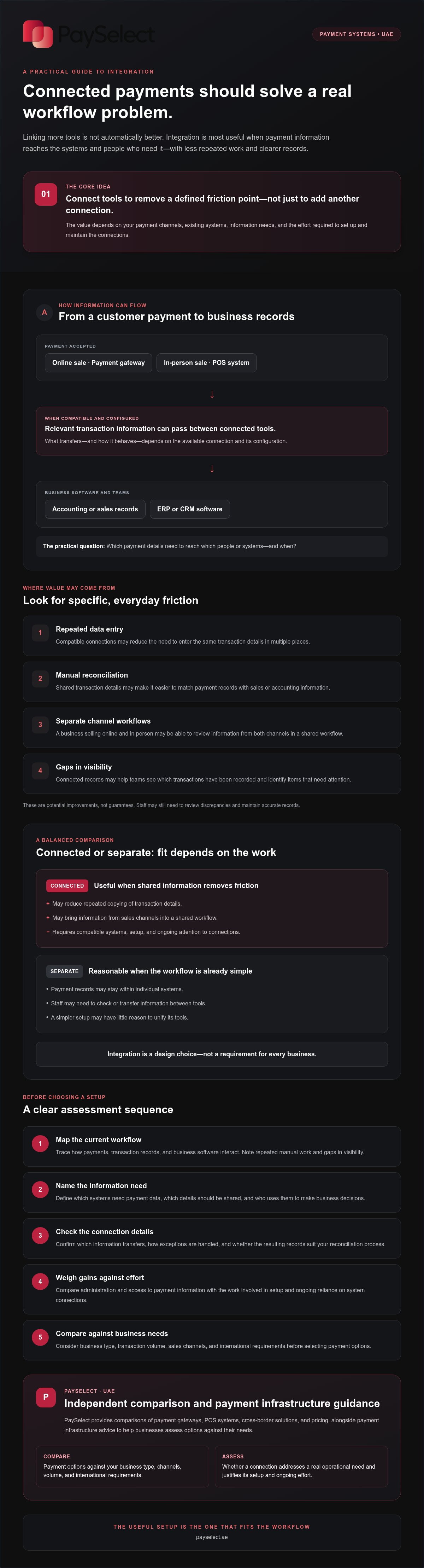
An integrated payment system connects payment acceptance with other tools a business uses to record transactions and manage operations. Depending on the setup, information from a sale may pass from a payment gateway or point-of-sale (POS) system into business software. This can reduce the need to enter the same details in multiple places. The wider payment system includes the components, rules, and technologies that enable payments. Integration describes how selected tools connect within that environment.
An integrated payment system links payment tools with other business systems; a standalone payment tool handles a payment without necessarily sharing its information with them. Connections can support clearer workflows, but they don’t turn every payment function into one universal product. The benefits of integrated payment systems depend on what information moves between which tools, and whether those connections suit the business.
Which business tools can connect to payment systems?
A payment gateway can support online acceptance, while a POS system can support in-person sales. If the selected systems allow it, transaction information may then connect with business software, such as an enterprise resource planning (ERP) system used to manage business processes or a customer relationship management (CRM) system used to organise customer information.
These are possible system categories, not guaranteed integrations. Connections vary by provider, configuration, and business requirements. Before choosing tools, check which information can be shared and whether the connection supports your team’s workflow. Businesses comparing online acceptance options can review payment gateway options as part of their wider setup.
How integrated payments differ from separate payment tools
With connected tools, transaction details may be shared across systems, depending on the available integration and its configuration. With separate tools, records may remain in individual systems, so staff might need to check or transfer information between them. Neither approach is right for every business. The practical difference is how payment information reaches the people and processes that need it.
Consider a business that sells through a website and a physical location. Online payments may be accepted through a gateway, while in-person transactions are taken through a POS system. If both tools connect to shared business software, staff may be able to review information from both channels in one workflow. If they don’t, each channel may have separate records and processes. A business with a simpler setup may have little reason to unify them. Integration is a design choice, not a requirement for every merchant.
How integrated payment systems can improve daily business operations
Connected payment data can reduce repeated work when compatible systems are configured to share the information a team needs. For example, transaction details might pass from a payment tool into accounting or sales software after a customer pays. Staff may then spend less time re-entering those details and more time reviewing exceptions, such as a payment that needs checking.
Integration creates value when it removes disconnected payment steps from a workflow. It doesn’t guarantee error-free records or lower costs. The result depends on which systems connect, what information they exchange, and how well the setup fits the way the business handles payments.
For each workflow, ask: which payment details need to reach which people or systems, and when? The answer helps teams focus on connections that support their work instead of adding complexity without a clear purpose.
More connected records and simpler reconciliation
Consider a typical transaction path: a customer pays, the payment system records the transaction, and staff later compare that record with sales or accounting information. If compatible tools pass relevant details along, a team may be able to match records with less manual copying. That can make it easier to spot items that need attention and see which transactions have been recorded.
Automation depends on compatibility and correct configuration. Check which fields transfer, how exceptions are handled, and whether the resulting records fit your reconciliation process. A connection can support clearer checks, but staff may still need to review discrepancies and maintain accurate records.
A smoother experience across payment channels
Customers may interact with a business online and in person. If payment tools connect with business software, staff may find it easier to review transaction information across channels rather than checking separate records. That visibility can help teams respond to payment queries with more context, provided the relevant information is available and the workflow is configured to share it.
Convenient checkout options can shape the customer experience, but integration alone doesn’t guarantee more completed purchases. Assess which payment methods and channels your customers use, then check that the chosen setup supports them. To compare online acceptance options, explore PaySelect’s payment gateway comparisons against your business requirements. PaySelect is an independent comparison and advisory platform, not a payment processor.
Integrated vs. separate payment systems: benefits, trade-offs, and fit
Connected payment workflows can make information easier to share across sales channels and business tools. Separate systems may be simpler to manage when payment activity is straightforward or records rarely need to move between teams. The right choice depends on whether integration solves a real operational problem.
The potential benefits of integrated payment systems are clearest when teams regularly handle hand-offs, repeated data entry, or transaction checks across multiple tools. But adding connections without a clear purpose can increase setup and maintenance work. Integration alone doesn’t guarantee lower fees, stronger security, or better performance.
Comparison point
Connected workflow: Transaction information may be available across linked systems, depending on compatibility and setup.
Separate workflow: Records stay in individual systems, which may mean staff check or transfer information manually.
Administration: Connections may reduce repeated tasks, but require configuration and ongoing oversight.
System dependencies: Connected tools rely on supported links between systems; separate tools may operate independently.
When connected payment workflows can be valuable
Integration may be worth assessing when a business accepts payments through several channels, passes transaction details between teams, or needs payment information in more than one system. For example, staff may need to review online and in-person sales alongside other business records. Businesses with international payment requirements should also check whether their tools support the workflows they need. The value comes from addressing those requirements, not from connecting everything by default.
A management article on streamlining operations discusses integrated payments in a healthcare context. It illustrates why organisations may consider how payment steps fit into wider administrative workflows. Specific needs and results vary by business.
What integration cannot guarantee
Results depend on provider capabilities, compatibility, and correct configuration. A connection may require migration planning, ongoing maintenance, or staff training. Before committing, clarify what data transfers, how exceptions are handled, and who will manage the connected workflow. If those demands outweigh the friction the connection removes, keeping tools separate may be more practical.
For cross-border payments, compare options against your actual international requirements rather than assuming integration will meet them. PaySelect’s cross-border payment solution comparison can help businesses assess available options. PaySelect is an independent comparison and advisory platform, not a payment processor.
How to assess whether integrated payments suit your business
Start with the workflow, not the feature list. The benefits of integrated payment systems matter most when a connection addresses a specific hand-off, reporting gap, or repeated task. Use this sequence to identify what your business needs:
Map payment journeys
Note where customers pay, such as online or in person, and which teams handle transaction records.
Identify friction
Look for repeated data entry, manual hand-offs, or information that’s hard to find when preparing reports or checking transactions.
Define requirements
Separate essential needs from desirable features. Identify which systems need payment data, who uses it, and what decisions they make with it.
Compare options
Check whether each option supports the required connections and workflows, then consider the total operational effort involved.
Map payment journeys and operational pain points
Trace a payment from customer checkout to the business records staff use. Does an online sale need to appear in another system? Do staff reconcile in-person payments separately? Note where information is copied, delayed, or missing. This helps distinguish a genuine integration need from a feature that sounds useful but won’t solve a current problem.
Compare the connections, not just the feature lists
For each option, confirm which systems it can connect to, what transaction information can be shared, and whether the setup fits your reporting needs. Ask about compatibility, support arrangements, maintenance responsibilities, and staff training. If in-person acceptance is part of your workflow, compare POS system options against those requirements. Businesses with international transactions should assess cross-border capabilities rather than assume a connection will meet every need.
Then weigh the expected improvement against the time and effort required to set up and manage the connection. PaySelect is an independent comparison and advisory platform. Its tools help businesses assess payment options against factors such as industry, transaction volume, and international requirements.
Compare payment solutions for your requirements to make your next step based on your actual workflows.
Choose an integrated payment setup through a clear comparison process
Choose connections that solve documented workflow problems, not integration for its own sake. The benefits of integrated payment systems depend on whether the setup fits your business type, transaction volume, payment channels, and international requirements. Start with what your business needs today, while considering how its payment operations may change.
What to prepare before comparing payment options
Build a clear picture of your current setup. Note where customers pay, which systems record transactions, and how your team uses payment information for reporting or daily decisions. Then describe the specific issues a new setup should address, such as repeated manual work or difficulty reviewing records across channels.
Before comparing options, list your essential requirements and questions:
• Which payment channels and business systems need to connect?
• What transaction information needs to be shared, and who will use it?
• Are the systems compatible, and what support arrangements are available?
• What does the pricing structure include, and what ongoing management will the setup require?
This preparation helps you compare practical fit rather than feature lists alone. If your business handles international transactions, include those requirements in your assessment and explore cross-border payment solutions.
How PaySelect can support an informed decision
Payment options differ, so the right fit depends on your requirements rather than a universal ranking. PaySelect’s Take the Test tool matches businesses with options based on industry, transaction volume, and international requirements. Its independent comparisons cover payment gateways, POS systems, cross-border solutions, and pricing. PaySelect receives success-based fees from providers for qualified merchant leads and provides transparent comparison data.
PaySelect is a comparison and advisory platform, not a payment processor or custom software developer. Larger organizations assessing their payment infrastructure can also consider its bespoke consulting and cost optimization audit services. The aim is to identify suitable options and assess their fit with your workflows, reporting needs, and operational effort.
With your requirements in hand, take the test to compare suitable payment options and assess which setup aligns with your business.
Make payment integration work for your business
The benefits of integrated payment systems come from connecting the steps that create friction, not from linking every tool available. Shared transaction information may simplify record handling and give teams a clearer view across payment channels, but compatibility, setup, and ongoing effort matter. Separate tools may be a better fit when they meet your needs without unnecessary complexity.
Before choosing, map how customers pay, where transaction records go, and which teams rely on them. Use those requirements to compare payment options, including the connections they support and the work involved in managing them. The right fit depends on your operations, not a one-size-fits-all solution.
PaySelect is an independent payment comparison and advisory platform. Its matching considers your industry, transaction volume, and international requirements, helping you assess options against your business needs.
Take the Test to compare payment options for your business, and move forward with a setup chosen for the way your business works.
Frequently Asked Questions
What is an integrated payment system?
An integrated payment system connects payment tools with business systems so they can share relevant transaction information or support linked workflows. For example, a payment record may pass into business software used for reporting. The exact connections depend on providers and configuration. Integration isn’t a single payment product. Before choosing connected tools, identify the operational problem you want to solve and confirm the proposed setup addresses it.
What are the main benefits of integrated payment systems?
The potential benefits of integrated payment systems include less repeated data entry, easier access to transaction information, simpler reconciliation workflows, and a more consistent view of payments across channels. These outcomes depend on system compatibility, setup, and the information shared. Integration doesn’t guarantee higher revenue, stronger security, regulatory compliance, or lower costs. Assess its potential value against your processes, reporting needs, and the effort required to manage the connection.
Can integrated payment systems reduce manual reconciliation?
They may reduce repetitive handling if connected systems pass payment details into the business records used for reconciliation. The result depends on what data is shared, how the connection is configured, and how your team handles exceptions, such as records that don’t match. Map your current reconciliation process first, then confirm that the proposed integration supports the records and reports your business uses.
Are integrated payment systems more secure than separate systems?
Integration alone doesn’t establish whether a payment setup is more secure. Security depends on provider capabilities, configuration, access controls, and how payment data is handled across connected systems. Before choosing, ask providers how the proposed connections work, who can access relevant information, and what support is available if an issue arises. Review the documentation they provide, and assess the full setup rather than assuming connected or separate tools are automatically safer.
Do small businesses need an integrated payment system?
Business size alone doesn’t determine whether integration is useful. A small business may benefit if disconnected payment tasks create meaningful administrative friction, while a straightforward setup may work well when existing workflows are manageable. Compare expected operational value with setup effort, compatibility, ongoing support, and the systems already in use. If a connection doesn’t address a clear need, adding it may create complexity without enough practical benefit.
Can a POS system and an online payment gateway work together?
Some business setups connect in-person POS payments with online payment workflows, but capabilities vary by provider and configuration. Confirm which transaction details can be shared, whether the connection supports your reporting needs, and how exceptions are handled. Compare options against the sales channels and business software you use. Don’t assume two tools will connect simply because both support payment acceptance.
How do I choose an integrated payment system for my business?
Document your payment channels, current systems, transaction volume, international requirements, and the operational issues you want to address. Then compare compatibility, reporting, pricing structure, support, and ongoing management effort. PaySelect’s Take the Test matches businesses with payment options based on industry, transaction volume, and international requirements. As an independent comparison and advisory platform, PaySelect helps businesses assess options using transparent comparison data.
Disclaimer
This content is for informational purposes only and should not be considered financial, legal, or regulatory advice. Payment provider availability, pricing, and approval processes vary depending on individual business circumstances. PaySelect does not guarantee provider acceptance or specific outcomes. Businesses should conduct their own due diligence before entering into any agreements.
Empowering businesses to achieve greater growth