

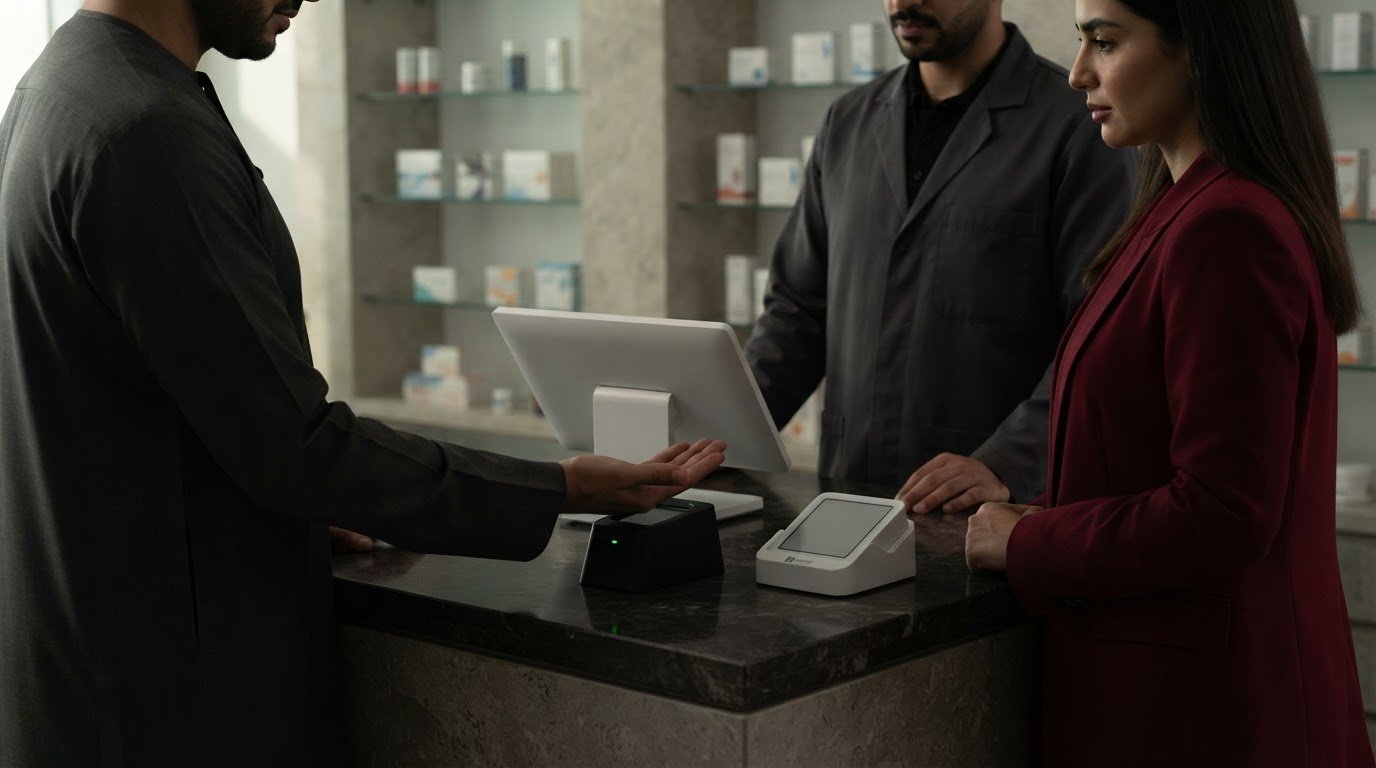
Biometric authentication for payments verifies a customer’s identity through a physical or behavioural trait, such as a fingerprint, face, palm, voice or iris. Put simply, what biometric authentication for payments means is using a distinctive personal feature to approve a transaction, often instead of entering a PIN.
Biometric authentication can make checkout feel more direct, but the experience depends on where verification takes place. A phone may authenticate its owner on the device, while an in-store system may scan a customer at the payment terminal. In either case, biometrics do not automatically replace every PIN or other security check.
This guide compares face, palm, fingerprint, voice and iris recognition, and explains how these methods differ from PIN authentication. It also covers what happens to biometric data during a payment and the security and privacy trade-offs UAE businesses should weigh when assessing payment options. The goal is to clarify how these methods work, where they fit and what to consider before adopting them.
Key Takeaways
• Understand how biometric checks match a person’s feature to an enrolled record or authenticate them on their device.
• Compare face, palm, fingerprint, voice and iris methods by how they work and where each may fit at checkout.
• See how device-based biometrics can support passwordless online payments without sending the biometric sample to the merchant.
• Weigh convenience against privacy and security considerations, including how biometrics differ from a PIN.
What are biometric payments?
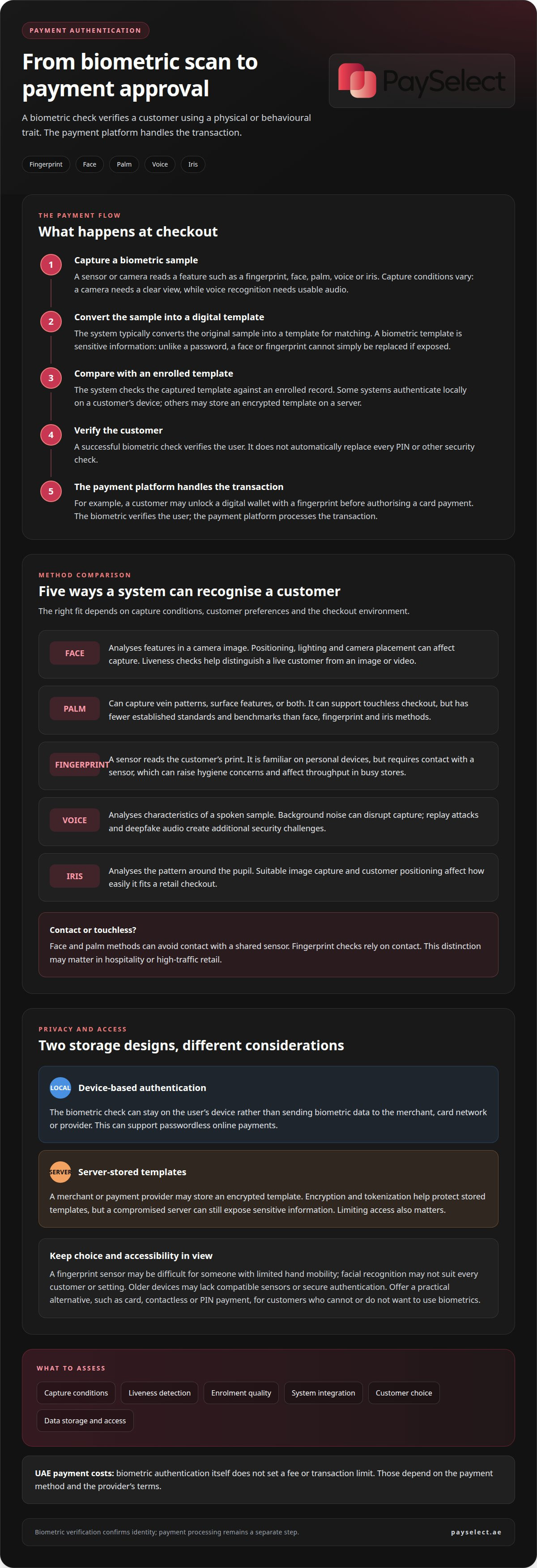
Biometric payments use a person’s physical or behavioural traits to verify identity and approve access to a payment method. A typical process captures a fingerprint, face or other sample, converts it into a digital template, then compares it with an enrolled template.
In the UAE, biometric authentication itself does not set a fee or transaction limit. Those depend on the payment method and the provider’s terms.
For example, a customer might unlock a digital wallet with a fingerprint before authorising a card payment. The biometric check verifies the user, while the payment platform handles the transaction.
Privacy and Biometric Data Protection
Biometric data protection involves limiting how identity information is captured, used and stored. Unlike a password, a fingerprint or face cannot simply be replaced after exposure, so a breach can create lasting privacy risks. For merchants, a key distinction is whether the system checks biometrics locally on a device or sends a template to a server. Each design has different implications for data access and storage.
User Consent and Control
Consent and user control explain whether a person agrees to biometric processing and can manage that choice. The European Union’s GDPR requires explicit consent to process biometric data except in limited cases. This is an EU rule, not a statement of UAE requirements. For users, clear information should explain the purpose of capture, where a template is kept, and how to stop using biometric verification. Device-based authentication can keep the biometric check on the user’s device.
Biometric Data Storage and Breach Risks
Merchants or payment providers may store an encrypted biometric template on a server. Device-based systems, by contrast, can keep biometric data locally rather than transmit it to the merchant, card network or provider. In either model, the original sample is typically converted into a digital template for matching. Encryption and tokenization help protect stored templates, but a compromised server can still expose sensitive information. Limiting access to stored templates also matters because biometric data cannot be reset like a password. For organisations managing these sensitive environments, IT and cybersecurity providers like Insoft Services offer consultancy and technical training to safeguard network infrastructure against breaches.
Comparing face, palm, fingerprint, voice, and iris biometrics
Each method captures a different signal, so its suitability depends on the checkout environment and customer experience. In a UAE store, a touchless face or palm check may suit a queue where customers prefer not to use a shared sensor. A fingerprint reader offers a familiar contact-based option, while voice and iris checks have their own capture requirements.
Face
Facial recognition analyses features in a camera image. It suits customer-facing terminals, but positioning, lighting and camera placement can affect capture. Liveness checks help distinguish a live customer from an image or video.
Palm
Palm systems capture vein patterns, surface features, or both. The method can support touchless checkout, but has fewer established standards and benchmarks than face, fingerprint and iris biometrics.
Fingerprint
A sensor reads the customer’s print. The method is familiar on personal devices, but requires physical contact, which can raise hygiene concerns and affect throughput in busy stores.
Voice
Voice recognition analyses characteristics of a spoken sample. Background noise can disrupt capture, while replay attacks and deepfake audio create additional security challenges.
Iris
Iris recognition analyses the pattern around the pupil. It requires suitable image capture and customer positioning, which can shape how easily it fits a retail checkout.
Touchless methods avoid contact with a shared sensor, while fingerprints rely on it. That distinction can matter in hospitality or high-traffic retail, where customers move quickly and the terminal is used repeatedly. Businesses considering an in-store setup can assess POS payment systems alongside the biometric method, since terminal compatibility shapes the customer flow.
No method works independently of its implementation. Capture conditions, liveness detection, enrolment quality and integration with the payment system all affect the experience. For example, a camera-based method needs a clear view of the customer, while voice authentication depends on usable audio. When assessing checkout options, compare these operational requirements and customer preferences, not just the type of biometric.
Biometric checkout and passwordless online access
Biometrics can verify a customer at a retail terminal or during mobile checkout. Online, a device can authenticate its user before approving a payment, without requiring them to type a password.
Accessibility and Usability
Accessibility means customers can complete checkout despite differences in ability, device access or comfort with biometric capture. A fingerprint sensor may be difficult for someone with limited hand mobility, while facial recognition may not suit every customer or setting. Mobile devices also vary: older hardware may lack a compatible sensor or secure authentication function. Offering a clear alternative helps prevent biometrics from becoming a barrier to payment.
For example, a retailer can offer card, contactless or PIN payment alongside a biometric terminal. This supports financial inclusion: customers without a suitable smartphone, or who choose not to enrol, should still have a practical way to pay. Explain the available options before customers reach the payment step.
Checkout Speed and Authentication Failure
Checkout speed depends on both the biometric match and payment authorisation. Facial recognition transactions have been reported to take under 5 seconds, but the full retail process also includes customer positioning, terminal response and payment approval. For online payments, FIDO2 is an open standard for passwordless authentication. A customer can unlock a supported device, approve a prompt and return to checkout without entering a password.
If biometric payment authentication fails or is unavailable, the customer can use another enabled method, such as a PIN, card or password. A store should make that fallback visible and usable, rather than leaving the customer stuck at the terminal. For mobile checkout, a payment gateway connects the authorisation flow to the merchant’s online payment setup; payment gateway options should fit the checkout journey and supported devices.
Biometric access can also depend on device settings, battery power, camera conditions and network connectivity. In a UAE retail setting, a well-planned checkout flow accounts for these constraints and provides a consistent alternative. This helps customers who cannot or do not want to use biometrics while keeping payment access straightforward.
Security trade-offs between biometrics and PINs
Biometric payment methods can be secure, but risks include spoofing, stolen templates and incorrect matches. A PIN can be observed or guessed, while a person cannot simply replace a fingerprint or face if biometric data is exposed.
Checkout Speed and Transaction Security
Checkout speed and transaction security must work together: a quick match still needs to verify the right person. Fast authentication does not remove the need for payment authorisation or other fraud controls.
For a retailer, the right balance depends on the purchase and checkout setting. A familiar, low-friction flow can support routine purchases, while an unusual transaction may call for another check. Systems can pair biometrics with a PIN or mobile device when additional verification is appropriate. This layered approach lets businesses adapt authentication to transaction risk rather than rely on one method for every customer.
Security Risks of Biometric Payments
Biometric security depends on how a system captures and evaluates a customer’s signal. A camera-based check can be targeted with an image or video, so liveness detection helps distinguish a real person from a spoofing attempt.
PINs are secret information that customers can change; physical traits are not. This difference matters if account credentials or biometric records are exposed. A sound design limits access to sensitive data, protects stored records and provides a way to revoke or re-enrol when needed. These controls address different risks and should work together, which is why organizations often rely on proactive cybersecurity and managed IT specialists like Trinity Networx, LLC to safeguard payment terminals and network infrastructure against emerging threats.
Customers also need a workable fallback. If a sensor fails or someone cannot use the biometric method, another authentication option can prevent a failed match from blocking a legitimate purchase. Choosing between biometrics and a PIN is not simply a matter of which is stronger. Businesses should consider spoofing, data exposure, customer access and transaction context together.
PaySelect
PaySelect helps UAE businesses assess payment options that support their wider checkout strategy. When considering biometric authentication, businesses should also assess how the payment setup supports it, including online or in-store acceptance, provider pricing and international payment needs. PaySelect’s comparison tools help merchants compare gateways, POS systems, cross-border payment solutions and pricing against their business requirements.
This can be useful when planning a new payment setup or reviewing existing arrangements. PaySelect helps businesses compare options and understand how payment infrastructure choices fit their operations, without turning biometric authentication into a payment service. Contact PaySelect to discuss your business payment requirements.
Plan your next payment decision
Understanding what biometric authentication for payments involves is a starting point, not a reason to adopt a new method by default. For UAE businesses, the next step is to map the customer journey: where payment happens, which devices customers use and how the wider payment setup supports that experience. This keeps the decision focused on operational fit as well as convenience.
PaySelect helps businesses assess payment options through its Payment Gateway Comparison Tool, POS System Selection Tool and Cross-border Payment Solution Matching. These tools help clarify the payment infrastructure around a checkout experience, whether customers pay online, in-store or across borders.
Bring your business requirements into the discussion and identify the options that fit your payment setup. Contact PaySelect to discuss payment options and take the next step with confidence.
Frequently Asked Questions
What is biometric authentication for payments?
Biometric authentication for payments uses a person’s distinctive trait to approve or help secure a transaction. For example, a customer might use a fingerprint to unlock a mobile wallet before selecting a saved card. The biometric check confirms access to the wallet; the card or wallet provider still handles payment authorisation. It is an authentication method, not a separate way to transfer funds.
How does biometric payment authentication work?
The process generally starts with enrolment, when a device or payment system records a biometric reference for later matching. During checkout, the person presents the same type of trait, and the system checks it against that reference. If the match succeeds, the payment flow continues to authorisation. For example, a wallet can require device authentication before allowing a customer to confirm an online card purchase.
What types of biometrics are used for payment authentication?
Payment authentication can use fingerprints, facial features, palm patterns, voice characteristics or iris patterns. The available method depends on the device or checkout system. A phone may support fingerprint or face recognition, while a retail terminal can use a camera-based face check. Palm and iris systems require compatible capture hardware, so they are not available at every checkout.
How do biometric payments compare with PINs, passwords, and one-time passwords?
Biometrics use a personal trait, while PINs and passwords rely on information a customer remembers. A one-time password adds a temporary code, often delivered through a separate channel. Each method has different usability and security considerations: a customer may forget a password, while a biometric check can fail if the sensor cannot read the trait. Payment systems may offer a fallback method.
How do I set up biometric authentication for payments on a phone or card?
On a phone, enable fingerprint or face authentication in the device settings, then follow the wallet’s steps to add a payment card and turn on biometric approval if offered. For a biometric card, follow the issuer’s enrolment process and instructions for linking the biometric feature to the card. The steps depend on the device, wallet and card issuer.
Disclaimer
This content is for informational purposes only and should not be considered financial, legal, or regulatory advice. Payment provider availability, pricing, and approval processes vary depending on individual business circumstances. PaySelect does not guarantee provider acceptance or specific outcomes. Businesses should conduct their own due diligence before entering into any agreements.
Empowering businesses to achieve greater growth
