
The gateway with the most familiar name may be the wrong fit for your business. Choosing an avenue payment gateway, or comparing any gateway option, takes more than looking at a headline rate. Pricing structure, integration needs, and the ways your customers pay all shape whether a setup works day to day.
Comparing options can feel complex. Fees may be presented in different ways, technical requirements can add work, and a business selling online, in person, or internationally may need different capabilities from one focused on a single market. A useful comparison starts with your current payment process and the problems you want a new setup to solve.
This guide shows you how to assess gateway fit using consistent operational and commercial criteria. You’ll learn which capabilities to prioritize, how to compare the full payment setup against your business needs, and how to move from a shortlist to a clear next step. PaySelect helps businesses across the UAE compare payment options against factors such as industry, transaction volume, and international requirements. Larger organizations can also use PaySelect’s advisory services to review their payment infrastructure and costs.
Key Takeaways
• When assessing an avenue payment gateway, focus on how well it fits your sales channels, customer needs, and daily workflows, not name recognition alone.
• Understand the gateway’s role in checkout, payment handling, and reporting so you can compare capabilities without confusing it with your bank or sales platform.
• Compare options using the same criteria, including integration fit, customer payment journeys, reporting, support responsibilities, and pricing structure.
• Build a shortlist around your industry, transaction volume, sales channels, and international requirements, then rank each option against your priorities.
• Before deciding, document what you need to clarify about integration, reporting, total payment costs, and ongoing responsibilities.
What should a payment gateway do for your business?
Start with how your business sells, not with a feature list. A gateway is a good fit when it supports the places customers pay, the payment journeys they expect, and the workflows your team uses to manage transactions. A business taking orders through a website may have different priorities from one collecting invoices or accepting payments in person.
A payment gateway is technology that securely passes a customer’s payment details from checkout to the services that process the transaction. It connects the checkout experience with payment processing, but it isn’t the bank, card network, or your website or sales platform. Capabilities vary, so the term alone doesn’t tell you which payment methods, sales channels, or reporting tools an option supports. For a neutral overview of the payment gateway concept, see Wikipedia.
Accepting a payment is only one part of the job. Your wider payment workflow may also involve tracking transactions, reconciling sales against orders, understanding when funds are settled, and resolving payment issues. Some needs depend on the gateway; others involve the connected provider, bank, platform, or your own internal processes. Compare the whole arrangement, not just the moment a customer checks out. PaySelect’s payment gateway comparison helps you assess options against your requirements.
Which payment needs should you define first?
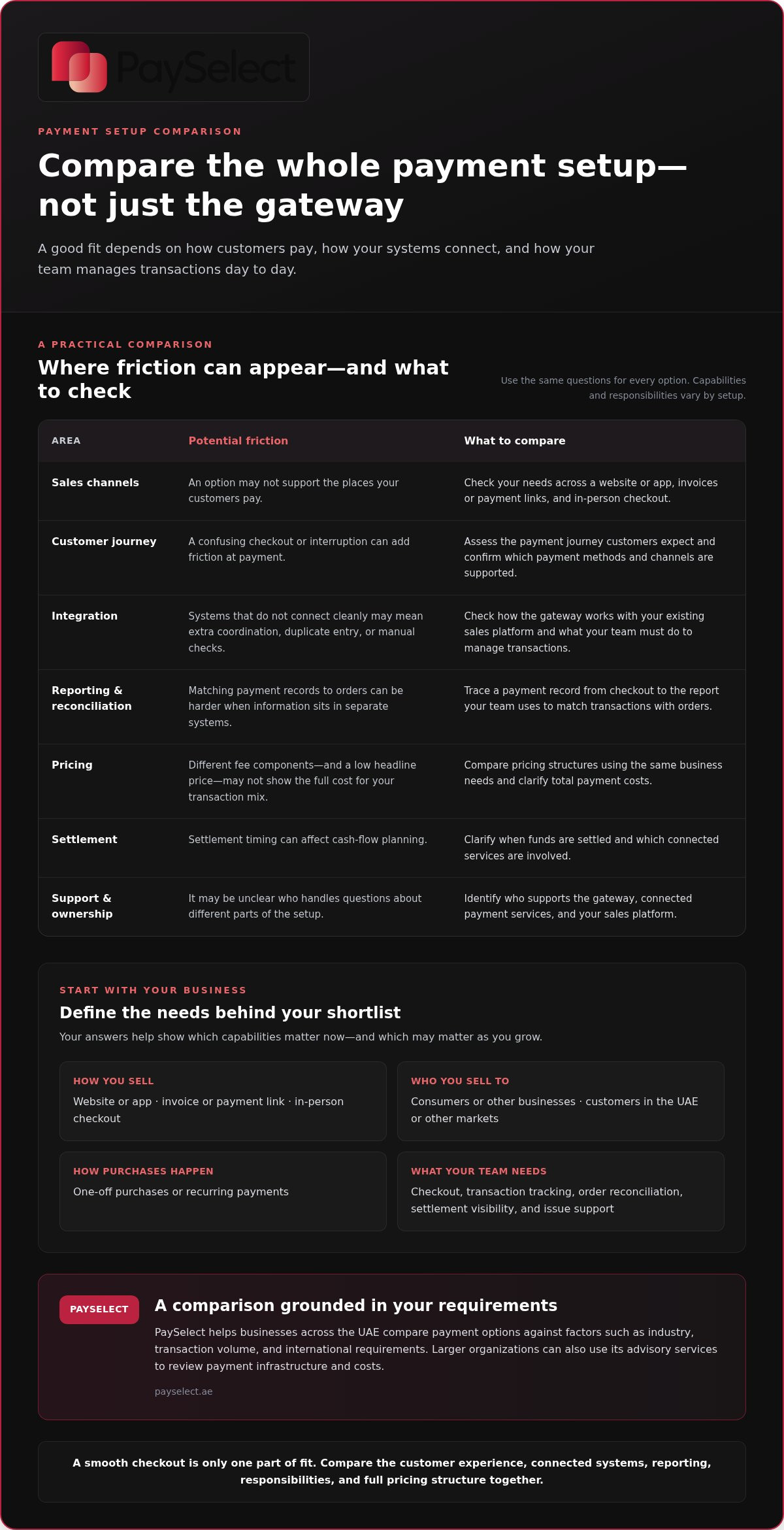
Map where customers pay: on a website or app, through an invoice or payment link, or at an in-person checkout. Then describe your business model in practical terms. Do you sell directly to consumers or to other businesses? Are purchases one-off or recurring? Are your customers based in the UAE or in other markets? Your answers help identify which payment journeys and operational workflows matter.
Separate what you need now from what may matter as you grow. A small business may prioritize a straightforward checkout and manageable reporting. A business expanding into new channels or markets may need more flexibility. If an avenue payment gateway is on your shortlist, assess it against the same requirements as every other option rather than treating the name as proof of fit.
Why can gateway selection feel more complicated than expected?
Comparisons can become difficult because pricing structures may include different components, integration can require coordination with existing systems, and settlement timing affects cash-flow planning. Support also matters. Identify who handles questions about the gateway, connected payment services, and your sales platform.
One attractive feature can’t answer all those questions. A smooth checkout may still leave reporting or integration gaps, while a low headline price may not show the full cost for your transaction mix. The choice can shape both what customers experience at payment and how your team tracks, reconciles, and supports transactions behind the scenes.
How does a payment gateway fit into the payment journey?
In a typical online payment, a gateway carries payment details from the customer’s checkout to the services involved in processing the transaction, then returns a response to the business. It supports the connection between checkout and payment processing. It isn’t the merchant’s website, the customer’s bank, or the card network, though those and other participants may play a role in completing a payment.
The journey starts on your sales platform, where a customer reviews an order and enters payment details. The gateway passes the relevant information into the payment process, which may involve other payment services and financial institutions. A response then returns through the connected system, allowing the checkout to show an outcome, such as a completed or unsuccessful payment. The exact flow can vary with the setup and the services involved.
What happens after a customer submits payment?
Think of it as a handoff, a decision, and a record. The customer submits details at checkout; the gateway helps route them into the processing flow; and the result is sent back to the checkout. Transaction information may also appear in reporting tools used by the business. The gateway supports this journey, but it doesn’t replace every other participant or automatically manage all business records.
For example, if a customer pays through your website, the checkout platform presents the order, the gateway connects payment details to processing, and the response helps the platform update the order status. The records your team uses for reconciliation may sit in a separate dashboard or system, depending on how the setup is arranged. When comparing options, trace how a payment record moves from the checkout to the report your team uses to match transactions with orders.
Where can payment setup create friction?
Integration choices shape how smoothly the parts work together. If the gateway doesn’t connect cleanly with your sales platform, staff may need extra steps to track transactions or match payment records with orders. A checkout that feels confusing or interrupts the customer journey can also create friction at the point of purchase.
Integration gaps
Teams may need to manage duplicate entry or manual checks if systems don’t share information as expected.
Reporting gaps
Transaction and order records may be harder to reconcile when useful details are spread across separate tools.
Unclear ownership
If it’s uncertain which party handles a payment issue, resolution can take more coordination and staff time.
Include these potential friction points when comparing options. Forbes offers a broader guide to choosing the right payment gateway; PaySelect’s payment gateway comparison helps you assess options against your business requirements. Whether you’re evaluating an avenue payment gateway or another option, map the full journey from checkout to reporting before deciding.
How should you compare payment gateway capabilities?
Compare each option against the same business requirements. Separate essentials, such as working with your sales channels and producing usable transaction records, from optional capabilities that may only matter as your business expands. This avoids choosing a gateway because of one attractive feature that doesn’t solve your wider operational needs.
The right gateway is the one that fits your complete payment operation, not simply the one with the most appealing individual feature. Use the criteria below to make comparisons consistent. For another perspective on how to choose a payment gateway, Forbes also outlines considerations such as integration and features.
| Criteria | Why it matters | Questions to resolve |
|---|---|---|
| Integration and onboarding | The setup needs to work with your website, app, sales platform, and team capacity. | What systems need to connect? What setup work will your team or technical support need to handle? |
| Customer journeys | Customers may pay online, in person, or through an invoice. The payment flow should suit the channels you actually use. | Which payment journeys are essential today? What changes if you add a channel? |
| Reporting and transaction visibility | Clear records help staff track payments and reconcile them with orders. | What transaction details are available, and how will your team use them in daily reporting? |
| Pricing structure | Different pricing components can make headline comparisons misleading. | Which charges apply to your business, and how do they relate to your transaction mix and expected activity? |
| Support and responsibilities | Knowing who handles setup questions and payment issues can reduce delays and confusion. | Which party supports each part of the setup, and who manages an issue through to resolution? |
Which commercial and operational criteria belong in a comparison?
Review costs as categories rather than assuming every option uses the same fee model. Consider transaction-related charges and any other applicable costs in the provider’s pricing structure, then compare them against your business’s expected activity. Also assess onboarding, integration effort, reporting access, and support responsibilities together. PaySelect’s payment gateway comparison helps businesses compare options against their industry, transaction volume, and operating requirements.
How do international requirements change the comparison?
Start with the markets you serve or plan to enter. Note where customers are located, which currencies your business needs to handle, and whether cross-border transactions are part of your current payment flow. These needs can affect which capabilities belong on your shortlist, but international reach is only valuable when it supports your actual customers and plans. For relevant needs, explore cross-border payment solutions.
Whether you’re assessing an avenue payment gateway or another option, rank each criterion as essential, useful, or not currently needed. This simple distinction keeps the comparison focused on fit rather than feature count.
How can you assess gateway fit before making a decision?
A reliable shortlist starts with your business requirements, not a long list of features. Use the same process for each option so you can see which capabilities meet a real need, which are preferences, and which may matter later.
How do you turn business needs into selection criteria?
Record where customers pay, where they’re located, how transactions move through your business, and what your team needs to see in reports. Include your industry and typical transaction volume, since these help define the operating context for your comparison. Then rank each requirement by impact and urgency.
1. Map the current setup.
List your sales channels, customer locations, connected systems, and the steps staff follow to track payments.
2. Set priorities.
Mark each need as essential, useful, or a future consideration. A requirement is essential if its absence would block a key sales channel or create substantial operational work.
3. Compare consistently.
Use identical criteria for every option, including integration, customer journeys, reporting, pricing structure, and support responsibilities.
4. Build a focused shortlist.
Keep options that meet your essential needs, then compare how well they address your useful priorities and likely growth plans.
For example, a business processing payments through a website and an in-person checkout should treat both channels as current needs if staff rely on them today. A possible future expansion into international sales is worth recording, but it shouldn’t outweigh a requirement that affects current operations.
How can you reduce uncertainty in the shortlist?
Keep a comparison record with each criterion, the information available, and any unresolved questions. Note what still needs clarification about system integration, pricing components, reporting, support ownership, and how a payment issue would be handled. This makes gaps visible and prevents a headline claim from standing in for a practical answer.
PaySelect’s matching tool uses your industry, transaction volume, and international requirements to help narrow options to your business context. That can make a broad comparison more manageable, especially when your needs span several channels or markets. If you’re considering an avenue payment gateway, apply the same process and scoring approach rather than relying on the name alone.
Use PaySelect’s payment gateway comparison to assess options against your documented business needs and build a focused shortlist.
What is the next step after shortlisting a payment gateway?
A shortlist is useful only if it leads to a decision you can explain and act on. Bring your documented priorities back into focus, then compare the remaining options against the same practical needs: connecting to your sales systems, giving your team usable transaction information, making payment costs understandable, and defining who handles support issues.
What should a decision summary include?
Keep the summary brief enough for the people involved in the decision to use. Capture the requirements that matter to your business and the trade-offs between shortlisted options, without letting a single feature dominate the outcome.
Core needs
Record your industry, transaction volume, sales channels, customer locations, and key workflow requirements.
Comparison criteria
Note how each option aligns with integration needs, reporting, pricing structure, and support responsibilities.
Open questions
List any details that still need clarification, such as the work involved in setup or how transaction records fit your existing processes.
Recommended direction
State which option best matches your priorities and why, including any trade-offs your business is prepared to accept.
For instance, a gateway that fits your online checkout but creates extra manual work for reporting may be less suitable than an option that supports your full workflow. The right direction depends on your operating requirements, not on a universal ranking. Apply the same decision logic whether you’re considering an avenue payment gateway or a different payment setup.
How can PaySelect support the selection process?
PaySelect’s comparison tool matches business requirements with payment options using factors such as industry, transaction volume, and international needs. This gives you a structured way to move from a broad market to a relevant shortlist. For larger organizations, PaySelect also provides payment infrastructure advisory and consulting to help review the wider setup against operational priorities.
Before proceeding, make sure your team understands the intended integration, the reporting approach, the full pricing structure, and who owns each support responsibility. Clear answers create a firmer basis for choosing and planning the next stage of your payment setup.
Choose a gateway that fits the way you do business
A strong payment setup supports more than checkout. It fits your sales channels, connects with your workflows, and gives your team clear ways to track transactions and understand costs. Whether you’re assessing an avenue payment gateway or comparing other options, use consistent criteria and prioritize the capabilities your business needs now while accounting for plans to grow.
PaySelect is an independent platform based in the UAE, focused on transparent payment comparisons. Its matching tool considers your industry, transaction volume, and international requirements to make a broad shortlist more relevant. Larger organizations can also use PaySelect’s advisory and payment cost optimization services when reviewing their payment infrastructure.
Make your next step with your business priorities in view. Compare payment gateway options with PaySelect to build a focused shortlist for your operations.
Frequently Asked Questions
What is a payment gateway?
A payment gateway helps pass a customer’s payment details from checkout into the services that process a transaction, then returns a response to the business. It connects parts of the payment journey, but it isn’t the customer’s bank, the card network, or your website. Features vary, so compare how each option supports your checkout, transaction records, and business workflows.
How do I choose a payment gateway for my business?
Choose by matching gateway capabilities to your actual sales and operating needs. List your sales channels, customer locations, transaction volume, industry requirements, and reporting needs. Then rank each requirement as essential, useful, or a future consideration. If an avenue payment gateway is on your shortlist, assess it against the same criteria as other options so the decision reflects your business priorities, not just its name or one feature.
What should I compare when evaluating payment gateways?
Compare integration requirements, the payment journeys supported, transaction reporting, support responsibilities, and pricing structure. Look beyond a headline rate: consider which pricing components apply to your expected activity and whether the reporting will help your team reconcile payments. Use a consistent record for every option, noting which requirements it meets and what remains unclear. This makes trade-offs easier to evaluate without relying on a single feature.
Can a payment gateway support international payments?
Some payment setups can support international transactions, but capabilities differ. Start by identifying where your customers are located, which currencies your business needs to handle, and the cross-border payment journeys you expect to offer. Assess these requirements against the markets you serve or plan to enter. PaySelect’s matching tool considers international requirements as part of its comparison, helping businesses focus on options relevant to their intended markets.
How much does a payment gateway cost?
There isn’t one universal payment gateway price. Costs depend on the pricing structure and which components apply to your business and transaction activity. Compare the full terms in UAE dirhams (AED), where available, rather than relying on a single headline figure. Include transaction-related charges and any other applicable costs in your assessment. PaySelect’s payment pricing comparison helps businesses review pricing alongside operational fit.
Do I need technical expertise to integrate a payment gateway?
Not always, but integration can involve technical work depending on your website, app, or sales platform and how the gateway connects to it. Before deciding, understand the setup steps, which systems need to work together, and who is responsible for each part. A straightforward fit with your existing platform may reduce internal effort, while a more involved setup may require technical coordination from your team.
How can I compare payment gateways without favouring one provider?
Use the same business-focused criteria for every option, including integration, customer payment journeys, reporting, pricing structure, and support. PaySelect is an independent comparison platform that matches requirements such as industry, transaction volume, and international needs. It receives success-based referral fees from providers for qualified merchant leads while offering transparent comparison guidance. Review options against your documented priorities so the comparison remains focused on fit.
Disclaimer
This content is for informational purposes only and should not be considered financial, legal, or regulatory advice. Payment provider availability, pricing, and approval processes vary depending on individual business circumstances. PaySelect does not guarantee provider acceptance or specific outcomes. Businesses should conduct their own due diligence before entering into any agreements.
Empowering businesses to achieve greater growth