To understand how to get a consolidated view of all your payments, first decide what business decisions the view needs to support. A team planning cash flow may need a different summary from finance staff reconciling transactions or preparing management reports. Set the purpose and audience before choosing tools, so the result answers a business question rather than merely gathering more data.
The main challenge is balancing detail with clarity. Senior leaders need readable trends and totals; finance teams need records they can trace. A sound reporting process supports both without treating a summary as a replacement for source documents.
This guide explains how consolidated invoices differ from standalone statements, why manual consolidation can strain finance workflows, and which software can bring payment information together. It also explains when comparing payment arrangements can help you assess your setup. The aim is to improve visibility while keeping reports useful for review, reconciliation and decisions.
Key Takeaways
• See how consolidated billing brings eligible charges together while standalone statements retain account-level detail.
• Understand why manual payment reconciliation can create extra work and make spending harder to track.
• Learn which tools can bring payment information from business accounts and cards into a more unified view.
• Explore how PaySelect’s comparison and matching tools can help assess payment options against your business needs.
Explanation
A standalone payment statement records activity for one account, card or service during a billing period. It may show transactions, adjustments and the payment method associated with that account. A consolidated statement groups eligible charges from multiple accounts or services into one invoice, often under a master account responsible for payment.
For example, a business with regional teams may use separate child accounts for online sales and office expenses. With consolidated billing, eligible charges can roll up to a parent account. Finance receives one payment request while retaining a breakdown by account or department. The combined invoice brings related service transactions together for audits and internal reporting.
Consolidation changes how charges are presented and paid, but it does not erase the underlying account activity. Standalone statements remain useful for tracing a transaction, reviewing a service or reconciling a specific card. A combined invoice can show the total due alongside itemised charges, giving finance a group total without losing account-level context.
Standalone
One account or service has its own statement and payment record.
Consolidated
Eligible charges from linked accounts appear together under a parent account.
Account detail
A combined invoice can provide grouped totals while separate records support transaction-level checks.
Currency also matters when accounts operate across markets. A consolidated invoice may group charges, but separate currencies or settlement records can still require distinct reconciliation. For international activity, cross-border payment flows may involve different collection and payout arrangements. Finance software can help map each charge to its account, currency and statement, then match invoice totals against payment records.
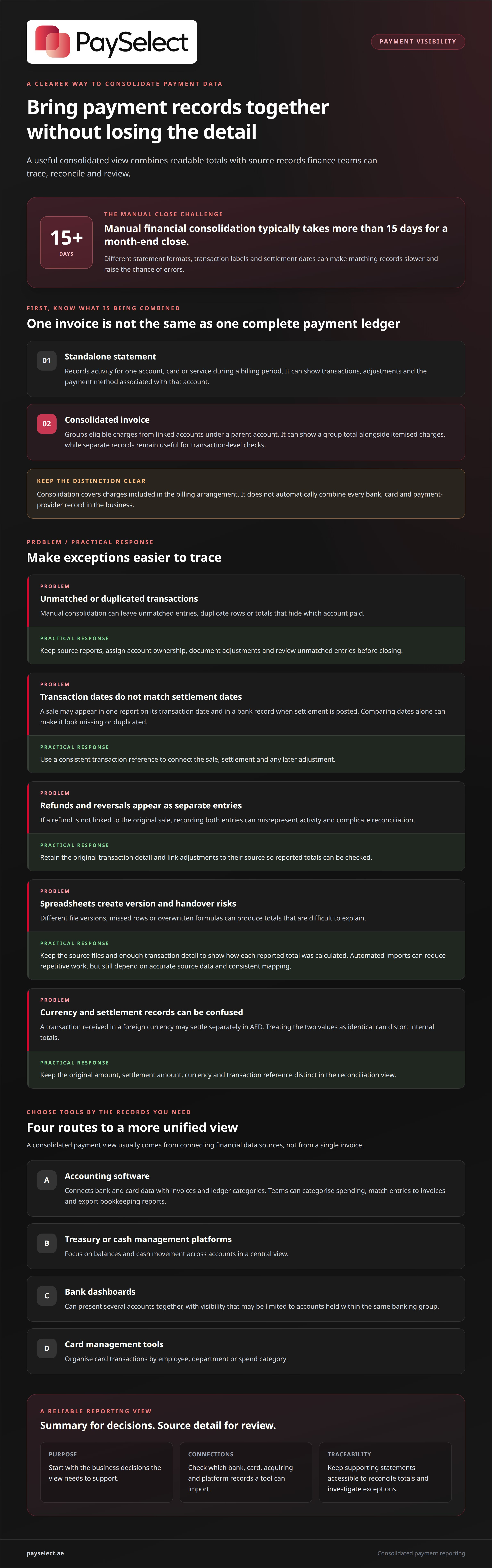
When assessing how to get a consolidated view of all your payments, distinguish invoice consolidation from full visibility across every account. Consolidation covers charges included in the billing arrangement; it doesn’t automatically combine 100% of a business’s bank, card and provider activity. A useful view keeps the summary and supporting statements accessible, making it easier to reconcile totals and investigate exceptions without confusing a single invoice with a complete payment ledger.
Challenges
Manual consolidation can result in unmatched transactions, duplicate entries and totals that hide which account paid. Refunds, disputes and unexplained differences are harder to investigate when staff cannot trace entries back to their source.
The workload also takes time from other finance tasks. Manual financial consolidation typically takes more than 15 days for a month-end close. A UAE merchant may need bank statements, card exports and acquiring reports before reconciliation begins. Different file formats and transaction labels can make matching records slower and increase the chance of errors.
Timing differences often cause reconciliation breaks. A card sale may appear in one report on its transaction date, then in a bank record when settlement is posted. Comparing dates alone can make staff treat the same payment as missing or count it twice. A consistent transaction reference helps connect the sale, settlement and any later adjustment.
Refunds and reversals need careful handling. A card refund, for example, may appear as a separate line instead of reducing the original sale in the same report. If an employee records both entries without linking them, the combined total may misrepresent activity. Finance staff then need to find the original transaction and correct the reconciliation.
Spreadsheets create version-control and handover risks. One employee may update a formula while another uses an older file, producing two totals for the same reporting period. A missed row or overwritten cell can also change a result without explanation. Rechecking the source file takes time and can delay reporting.
Multi-currency activity adds complexity. A UAE business may receive a transaction in a foreign currency and see the settlement recorded separately in AED. Treating those values as identical can distort internal totals. Keep the original amount, settlement amount and transaction reference distinct.
Reduce these risks by keeping source reports, assigning account ownership, documenting adjustments and reviewing unmatched entries before closing. Automated imports can cut repetitive work, but still depend on accurate source data and consistent mapping. Retain enough transaction detail to show how each reported total was calculated.
Practical Advice
A consolidated payment view usually comes from connecting financial data sources, not from a single invoice. For a UAE business, these sources may include bank accounts, corporate cards, acquiring reports and online payment platforms. Choose a tool based on the records it can import and how clearly it displays transactions, balances and settlement details.
Accounting software can combine bank feeds and card transactions in a shared ledger. Finance teams can categorise spending, match entries to invoices and export bookkeeping reports. Treasury or cash management platforms focus more on balances and cash movement across accounts. Bank dashboards may also show several accounts together, but visibility can be limited to accounts held with that bank. In specialized sectors such as behavioral healthcare, dedicated revenue cycle management partners like lumierebilling.com assist providers with consolidating complex billing workflows and tracking payment streams.
Accounting software
Connects bank and card data with invoices and ledger categories.
Treasury platforms
Bring account balances and cash movements into a central view.
Bank dashboards
Present accounts held within the same banking group.
Card management tools
Organise card transactions by employee, department or spend category.
Payment platforms add another layer. An online merchant may need gateway transaction records alongside bank settlements and card statements. A payment gateway setup can affect which transaction and settlement reports are available for reconciliation. Retail businesses may also receive separate reports from their acquiring and point-of-sale systems.
To see how to get a consolidated view of all your payments, compare tools by connected records, update frequency, currency handling and export options. A finance team managing AED and foreign-currency accounts should preserve each transaction’s original currency and distinguish it from any converted settlement. Combined reports should retain account names, transaction references and settlement dates.
Integration methods differ. Direct bank feeds can import transactions automatically; file uploads are an alternative when a feed is unavailable. APIs transfer structured data between systems, while spreadsheets can serve as a manual bridge. Choose a source of truth for each record type, then use consistent categories and account labels to prevent duplicates and support clearer reporting.
Before connecting business accounts, review access controls. Assign permissions by role, restrict access to sensitive card details and retain source statements for audit trails. For organisations where transaction monitoring and record-keeping also support regulatory compliance, Trancher provides comprehensive AML/CTF program management to streamline oversight. Test a reporting period against the original bank and card records before relying on a combined dashboard for management decisions.
PaySelect Relevance
PaySelect helps UAE businesses assess whether their payment setup supports clear, manageable reporting. Its comparison and matching tools help identify payment services suited to a business model, transaction channels and operating needs. They inform payment infrastructure decisions, but do not replace accounting records or bank statements.
Businesses accepting cards online and in person may receive payment reports from different systems. PaySelect’s Payment Gateway Comparison Tool and POS System Selection Tool help compare options for these acceptance channels. This can help decision-makers understand how provider choices relate to settlement reports, transaction data and reconciliation workflows.
Payment pricing comparison can also help when multiple providers or services contribute to payment costs. Reviewing pricing structures alongside transaction and settlement reports can show which charges deserve closer attention. You can assess your current arrangement without assuming that switching providers is the only option.
Businesses collecting or paying across borders may need to consider currency handling and international settlement alongside domestic card activity. PaySelect’s Cross-Border Payment Solution Matching helps businesses compare options for these needs. The resulting payment setup still requires consistent accounting records to connect provider reports with bank entries and internal reporting.
Consider PaySelect when assessing providers, reviewing pricing or planning payment operations across multiple channels or markets. Set out your requirements, including sales channels, customer locations, settlement needs and reporting priorities. This helps shape a relevant comparison and identify which payment capabilities matter most.
If you simply need a combined dashboard for bank accounts and cards, focus on financial software that connects those accounts. PaySelect helps merchants compare payment providers, pricing and infrastructure choices that shape payment activity. Keeping these roles distinct separates provider selection from day-to-day bookkeeping and reconciliation.
For a discussion about your payment requirements, contact PaySelect.
Frequently Asked Questions
How does consolidated billing work?
Consolidated billing groups eligible charges from linked services or child accounts into one billing cycle, then issues an invoice to the account responsible for payment. For example, a business with regional accounts can receive a monthly invoice while retaining itemised activity for each account. Using the same payment method across included services can simplify administration. The billing period and invoice date help finance teams schedule payments and reporting.
Disclaimer
This content is for informational purposes only and should not be considered financial, legal, or regulatory advice. Payment provider availability, pricing, and approval processes vary depending on individual business circumstances. PaySelect does not guarantee provider acceptance or specific outcomes. Businesses should conduct their own due diligence before entering into any agreements.
Empowering businesses to achieve greater growth