Yes, businesses in the UAE can take card payments by phone without a card reader. The practical answer to how to accept card payments over the phone securely is to enter the customer’s card details into a secure payment gateway or virtual terminal, then follow safeguards for handling card data. A virtual terminal works online wherever there’s a secure internet connection.
Phone payments are useful when a customer can’t complete a purchase in person or through a payment link. They’re card-not-present transactions, so secure handling matters. Businesses must comply with PCI DSS, the Payment Card Industry Data Security Standard, which sets rules for protecting customer data.
This guide explains how phone transactions work, how to reduce risks such as fraud and data exposure, and what PCI DSS means in practice. It also covers when taking payment by phone makes sense and when a payment link may offer a smoother way for customers to enter their own card details.
Key Takeaways
• Choose between taking card details during a call and sending a payment link based on the customer’s needs and your workflow.
• Reduce card-not-present risks by setting clear staff procedures for handling payment details and documenting transactions.
• Use phone payments when a conversation helps complete an order, such as when customers need assistance or can’t pay in person.
• Compare gateway options with PaySelect’s Payment Gateway Comparison Tool to find a setup that fits your business needs.
Can you accept credit card payments using a phone?
Yes. A virtual terminal lets a UAE business accept card payments online without a physical card reader. To accept card payments over the phone securely, start by choosing a payment method that suits the customer and transaction.
•
Compare Phone Payments With Online Options
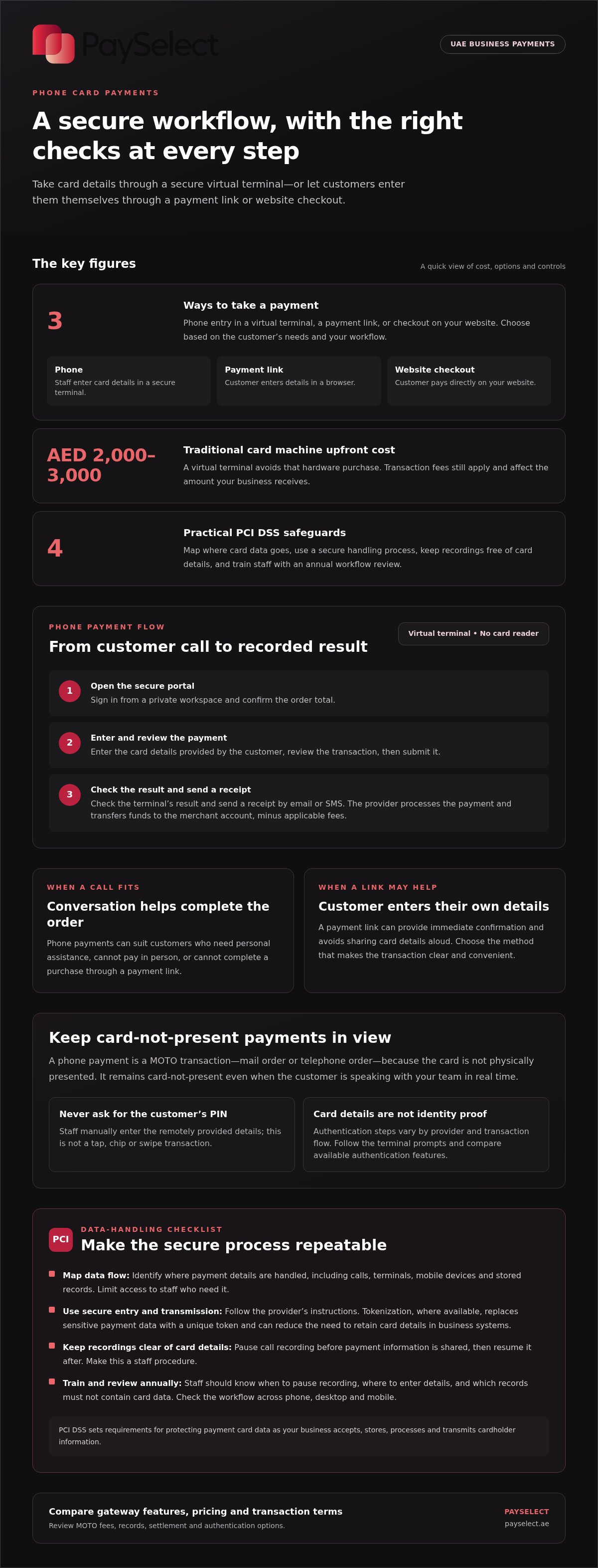
Choose the checkout method that suits the customer. During a phone transaction, staff enter the card number and requested details into a secure virtual terminal. With a payment link, the customer enters their details in a browser; online checkout lets them pay directly on your website. Links can provide immediate confirmation and avoid sharing card details aloud. For international payments, consider how acceptance supports cross-border payments.
•
Choose a Virtual Terminal or MOTO Tool
Select a virtual terminal for browser-based payment entry without a card reader. A MOTO tool handles mail order and telephone order transactions, where the card isn’t physically presented. Compare transaction records, settlement to your merchant account, and applicable fees. Traditional card machines in the UAE can cost د.إ 2,000 to د.إ 3,000 upfront; a virtual terminal avoids that hardware purchase. Transaction fees still affect the amount received.
•
Take Payment Through a Virtual Terminal
Sign in to the payment provider’s secure portal from a private workspace. Confirm the order total, enter the card details the customer provides, and review the transaction before submitting it. Check the result in the terminal, then send a receipt by email or SMS. The selected provider processes the payment and transfers funds to the business’s merchant account, minus applicable transaction fees. This workflow also makes transactions easier to track.
•
Review Authentication and Provider Options
When choosing how to accept card payments over the phone securely, compare the authentication steps and MOTO tools offered by UAE payment providers. Authentication varies by provider and transaction flow, so follow the terminal’s prompts and don’t treat card details alone as proof of identity. Compare features and pricing rather than assuming every provider uses the same process.
Phone payments as card-not-present transactions
Treat a phone order as a card-not-present payment because the card isn’t physically presented. This classification affects transaction risk and how you handle credit card details.
•
Classify Phone Payments as Card-Not-Present
Record phone orders as MOTO transactions, meaning mail order or telephone order. The cardholder provides details remotely, and staff enter them manually, rather than the customer inserting or tapping a card at a terminal. It remains a card-not-present transaction, even when the customer is speaking with your team in real time. Don’t ask for the customer’s PIN during a MOTO payment.
Keep this distinction clear in your records. A phone payment differs from an NFC contactless transaction, where a card or mobile device is physically tapped at a reader. A mobile card reader can accept tap, chip, and swipe payments, but those methods require the customer to be present.
•
Review Fees for Manually Entered Transactions
Before accepting manually entered card details, review how the provider prices those transactions. The fee depends on the provider’s pricing structure and transaction type, so compare the terms for MOTO payments with those for other card acceptance methods. Don’t assume a phone transaction carries the same fee as a tap or chip payment.
Also account for the cost of disputes. Check how transaction fees and chargeback costs affect the amount your business receives. For a clearer view of gateway pricing differences, explore payment gateway options.
PCI DSS compliance
For UAE businesses that accept card payments by phone, PCI DSS sets requirements for protecting payment card data. Apply the standard to how your business accepts, stores, processes, and transmits cardholder information.
Map where card details go.
Identify every method that handles payment information, including calls, digital terminals, mobile devices, and stored records. PCI DSS applies to phone payments as well as other card transactions. Limit access to staff who need payment details for their assigned tasks, and avoid copying card information into unrelated notes or files.
Use a secure process to handle data.
Follow your payment provider’s instructions for entering and transmitting card details. Use tokenization where available: it replaces sensitive payment data with a unique token and can reduce the need to retain card details in business systems. Review each step, from the initial call through transaction processing and record keeping.
Keep card details out of call recordings.
Pause call recording before the customer shares payment information, then resume it after they finish. This prevents the recording from capturing card details and is stated as mandatory under PCI DSS and many regional data protection laws. Make the pause part of the staff procedure, not an informal reminder.
Train staff and review the workflow annually.
Train employees on data security and payment-handling procedures annually. Use a clear example: staff should know when to pause recording, where to enter details, and which records must not contain card data. Check that the process works across phone, desktop, and mobile workflows, whether employees use hardware or a browser-based terminal.
When phone card payments are useful
Phone payments work best when a conversation helps complete an order or address a customer’s immediate need. Use them selectively, choosing the payment method that makes the transaction clear and convenient.
Use a call when the customer needs personal assistance.
A customer arranging a home repair may need to confirm service details before paying. Taking a card payment during that conversation can keep the booking moving without sending them through a separate checkout. Confirm the order and amount aloud before processing to reduce errors.
Match the method to the customer’s situation.
A phone payment can help when a customer is already speaking with your team or can’t complete an online checkout. Payment links suit customers who prefer to enter card details themselves. Offer the method that fits the conversation instead of making phone payment the default for every order.
Consider where phone orders are part of daily operations.
According to Statista, businesses in healthcare, legal services, home repairs, and hospitality handle thousands of phone orders daily. For example, a hospitality team may take a reservation request by phone, while a repair business may collect payment after confirming a service booking. Build a clear process for confirming amounts and recording completed transactions.
Set a clear point for switching methods.
If the caller wants to enter their own card details, offer a payment link instead of asking them to share those details verbally. If staff need to assist with the order, a phone transaction may be more practical. Compare payment gateway options to find methods that fit your workflow, customer preferences, and transaction needs.
Compare payment gateway options to assess how different payment methods can support your phone-order process.
PaySelect: Payment Gateway Comparison Tool
PaySelect helps UAE businesses compare payment gateways and assess which options fit their phone-payment workflow. Its Payment Gateway Comparison Tool matches businesses with payment providers based on factors such as industry, transaction volume, and international requirements.
Use the tool when you’re weighing virtual terminal capabilities, payment methods, or transaction pricing and want a clearer view of the differences. PaySelect also offers payment pricing comparison, POS System Selection Tool, and Cross-border Payment Solution Matching for businesses assessing a broader payment setup.
Compare options against your customer journey, operating needs, and growth plans before choosing a payment provider. Try PaySelect’s comparison tool to explore suitable options for your business.
Build a Payment Workflow That Can Grow
Start by reviewing how payment choices fit your customer journey. Consider who places phone orders, when staff need to assist, and how payment records move through your business. These decisions can help you build a consistent process across teams and customer interactions.
To accept card payments over the phone securely, document each step from the customer’s request to the completed transaction. Use the workflow to identify where staff need clearer procedures, where customers could benefit from another payment option, and which provider capabilities fit your operations.
PaySelect can help you assess payment options against your business needs. Start a conversation with PaySelect about your payment setup and take the next step toward a more considered approach. With a clear process and a suitable payment setup, your team can serve customers with confidence as your business develops.
Frequently Asked Questions
Can a business store my card details from a phone call?
A business handling cardholder data must protect it under PCI DSS. As a customer, ask whether your details will be retained or replaced with a payment token. For a repeat purchase, a token can support later payment processing without keeping the original card details in ordinary business records. Don’t share card information in a voicemail or unprotected message.
What information do businesses need to process a phone payment?
For a manually entered phone transaction, businesses typically need the card number, expiry date, and CVV, as well as the amount to charge. Confirm the purchase and amount with the caller before submitting the transaction. A business should never ask for your PIN for a phone payment. If you’d rather not say your card details aloud, ask for a payment link so you can enter them yourself.
How do phone card payments work with virtual terminals?
A virtual terminal lets authorised staff enter payment details through an online payment interface instead of using a card reader. For example, after confirming a telephone order, an employee enters the card details and amount, then submits the transaction. The terminal displays the result, which staff can use to update the order record. Limit access to employees who handle payment tasks.
What steps should businesses follow to take card payments by phone securely?
Set a consistent routine: take calls in a private space, confirm the order and amount, enter details directly into the payment interface, and send a receipt by email or SMS. Let customers initiate the call where possible. After payment, customers can review their bank statement within 24-48 hours. These steps help customers spot an unexpected charge and give staff a clear process to follow.
Which PCI DSS rules apply to card-not-present phone payments?
PCI DSS applies to phone transactions because the business accepts, processes, transmits, or stores cardholder data. The standard requires businesses to handle that information safely; it isn’t limited to payments made with a card physically present. Apply safeguards across the full payment workflow, including staff access and records. If calls are recorded, pause recording before customers provide card details.
Can businesses record or store customers’ card details during phone calls?
Call recording and card-data storage are separate issues. If a business records calls, it should pause recording before the customer shares card details, then resume afterward if needed. Don’t use a call recording as a payment record. For transaction records, retain the information needed for business operations without putting full card details in general notes, email, or other unprotected records.
Disclaimer
This content is for informational purposes only and should not be considered financial, legal, or regulatory advice. Payment provider availability, pricing, and approval processes vary depending on individual business circumstances. PaySelect does not guarantee provider acceptance or specific outcomes. Businesses should conduct their own due diligence before entering into any agreements.
Empowering businesses to achieve greater growth