
In 2024, 22% of Baymard Institute survey respondents said they had abandoned a cart in the previous three months because checkout was too long or complicated. The practical answer to how to create a seamless payment experience is to remove unnecessary steps, make payment choices clear and help customers pay securely without requiring an account. Guest checkout, straightforward recurring billing and hosted payment forms can each simplify a different part of the journey.
Customers expect payment to feel like a natural part of shopping, not a separate hurdle. For UAE businesses, a seamless payment experience should work smoothly across devices and accommodate different customer preferences. This guide explains practical ways to reduce checkout friction, from guest checkout and recurring payments to payment methods and hosted forms, so you can identify improvements that suit your customer journey and payment setup.
Key Takeaways
• Offer guest checkout and keep forms focused on essential details to make completing an order easier.
• Make recurring billing clear and secure, with a straightforward way for customers to manage or cancel payments.
• Match payment methods to how customers shop across mobile, desktop, and in-store channels.
• Consider hosted payment forms to simplify payment handling while keeping the checkout journey cohesive.
1. Guest checkout
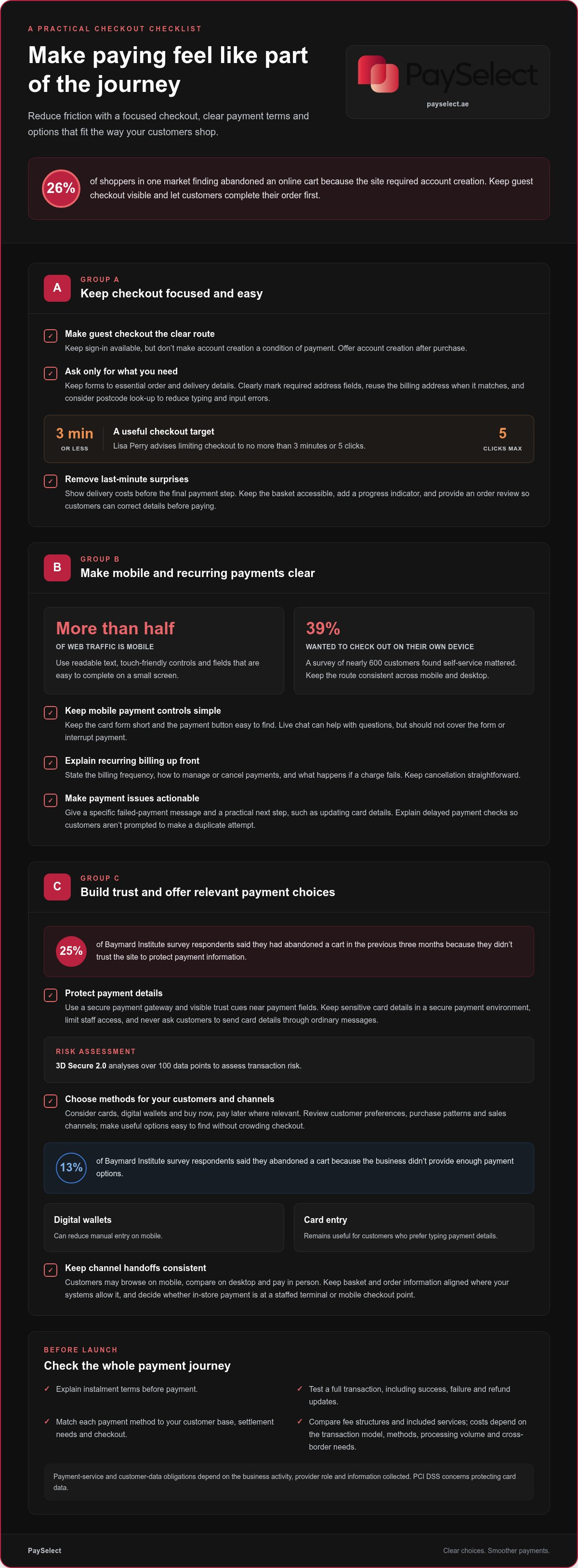
Make guest checkout the clear route for first-time buyers. One market finding reports that 26% of shoppers abandoned an online cart because the site required account creation. Let customers complete the transaction first, then offer account creation after purchase. This keeps registration from becoming a condition of payment and gives returning shoppers an option to save details later.
Keep the path focused. Lisa Perry advises limiting checkout to no more than 3 minutes or 5 clicks. Ask only for information needed to fulfil the order, and label required delivery-address fields clearly. If billing and shipping addresses match, offer a selection that reuses the billing address. A postcode look-up can also populate address details, reducing typing and input errors.
Show delivery costs before the final payment step. An unexpected shipping charge can make customers reconsider, even after they have chosen their products. Add a progress indicator so shoppers know where they are and what remains. Keep the basket accessible, and provide a final order review where customers can correct an address or product choice before paying.
Design for mobile first: more than half of web traffic comes from mobile devices. Use touch-friendly controls, readable text, and fields that are easy to complete on a small screen. Keep the credit card form short, and make the payment button easy to find without accidental taps. Live chat can help when a shopper has a question about delivery or a checkout field, but it should not cover the form or interrupt payment.
Consumer preferences also include self-service. In a survey of nearly 600 customers, 39% wanted to check out on their own device. Give shoppers a consistent route whether they browse on mobile or desktop, and keep guest checkout visible beside sign-in. These practical steps reduce friction without forcing every customer through the same account setup.
2. Recurring billing and payment security
For UAE online payments, businesses need to account for applicable rules covering payment services and customer data. The obligations depend on the business activity, the payment provider’s role, and the information collected. Build privacy and security considerations into the payment flow from the start.
Make recurring billing transparent before customers save a preferred payment method. Explain the billing frequency, how customers can manage or cancel payments, and what happens if a charge fails. Keep cancellation straightforward. Clear terms and an accessible cancellation route support trust and can help reduce disputes. For failed transactions, provide a specific message and a practical next step, such as updating card details. Avoid repeated retries without explaining what the customer needs to do.
Use a secure payment gateway and visible trust cues near payment fields. Baymard Institute research found that 25% of survey respondents had abandoned a cart in the previous three months because they didn’t trust the site to protect payment information. 3D Secure 2.0 analyses over 100 data points to assess transaction risk. Keep payment pages consistent with the rest of the customer experience, and avoid asking customers to send card details through ordinary messages.
PCI DSS concerns protecting card data. Reduce exposure by using a payment flow that keeps sensitive card details within a secure payment environment, and limit staff access to payment information. Treat payment status messages as operational events: connect every success, failure, refund, or chargeback update to the correct order. If a status is delayed, tell the customer the payment is still being checked rather than prompting another attempt that could create a duplicate transaction. Record refund progress and communicate the outcome clearly.
Gateway and processor costs vary by transaction model, payment methods, processing volume, and cross-border requirements. The applicable price depends on the case and is provided after a quote request; compare the fee structure and included services, not one headline rate alone.
PCI DSS concerns the protection of card data. Other obligations for payment services and customer data depend on the business activity, the provider’s role, and the information collected.
3. Supporting multiple channels and payment methods
For UAE customers, consider familiar choices such as cards, digital wallets, and buy now, pay later where relevant. No single method suits every shopper. Review customer preferences, purchase patterns, and sales channels, then make the most relevant options easy to find at checkout.
Payment choice can affect whether a customer completes an order. In the Baymard Institute survey, 13% of respondents said they abandoned a shopping cart because the business didn’t provide enough payment options. Add alternatives customers actually use, but keep the checkout process organized. Group methods clearly, explain any instalment terms before payment, and avoid crowding the page with options that don’t fit your audience.
Support each sales channel with a consistent payment journey. A customer might discover a product on mobile, compare details on desktop, and pay in person. Keep basket and order information aligned across channels where your systems allow it. For in-store transactions, decide whether customers should pay at a staffed terminal or through a mobile checkout point.
When choosing local payment methods, consider how each option fits your customer base, settlement needs, and existing checkout. A method that works well for online orders may not suit point-of-sale purchases. For example, digital wallets can reduce manual entry on mobile, while card entry remains useful for customers who prefer typing their payment details.
For popular UAE ecommerce platforms, gateway integrations may use a supported plugin, hosted checkout, or an application programming interface. The right route depends on the platform’s available integrations and the payment methods you want to accept. Before launch, test a complete transaction, including success, failure, and refund updates. This helps confirm that payment status is communicated clearly across sales channels.
Build your payment-method mix around customer behaviour, not assumptions. Review completed and abandoned transactions by channel and method, then adjust the available options and their order. A focused selection can make checkout convenient without adding unnecessary choices or fields.
Customer preferences vary. Assess cards, digital wallets, and buy now, pay later against your customers’ purchasing patterns and sales channels rather than assuming one method is right for everyone.
4. Seamless payment experience and hosted payment form
A hosted payment form gives customers a dedicated place to enter payment details during online shopping. Depending on the setup, it may open on a separate page or appear within the checkout. Either way, make the transition clear: align the visual style, explain what happens next, and return customers to an order confirmation after payment.
Consistency matters throughout the customer journey. If a hosted form suddenly changes the layout or uses unfamiliar labels, customers may hesitate before submitting a transaction. Use clear field names, show the order total, and make the payment action easy to identify. If payment fails, display a specific message and let customers correct the issue without restarting their shopping journey.
Baymard Institute reports online cart abandonment rates of around 70%, while its 2024 survey found 22% of respondents abandoned a cart because checkout was too long or complicated. A hosted form can support a more focused payment step, but it still needs careful design. Check how it behaves on mobile and desktop, whether customers can review order details, and how refunds or payment-status updates appear.
Measure the payment experience at each stage. Checkout conversion is completed purchases divided by checkout starts. Authorization rate is approved payment attempts divided by submitted attempts. Compare these measures by device, channel, and payment method to identify friction. For example, lower mobile conversion alongside steady authorization may point to confusing fields or a difficult form rather than declined transactions.
Test the complete flow with real users before launch. Walk through a successful payment, a declined card, and a customer returning from the hosted form. Confirm that the order status updates correctly and customers receive a clear confirmation. Review performance regularly, then make one focused change at a time so you can identify what improves the journey and conversion.
PaySelect: Payment Gateway Comparison Tool
PaySelect’s Payment Gateway Comparison Tool helps UAE businesses compare options based on their industry, transaction volume, and international requirements. Use it when your checkout creates friction or when you are assessing gateways for a new sales channel. The comparison can clarify differences in payment methods, features, and pricing structures.
For in-person sales, PaySelect’s POS System Selection Tool helps businesses compare point-of-sale options. Cross-border Payment Solution Matching supports businesses evaluating international payment needs. These tools help clarify the choices without assuming one solution suits every business.
Contact PaySelect to explore the comparison tools relevant to your payment setup.
Keep your payment setup ready for what’s next
Customer expectations and business needs evolve. Treat payment design as an ongoing part of business growth: review where customers encounter friction, consider how new sales channels change their needs, and refine the experience as your business expands. The best way to create a seamless payment experience is to connect each payment decision to the customers you serve and the way your business operates.
When you are ready to compare payment options, PaySelect offers a Payment Gateway Comparison Tool, a POS System Selection Tool, and Cross-border Payment Solution Matching. These free tools can help you assess choices for online checkout, in-person sales, or international transactions, without assuming one setup suits every business.
Explore payment options with PaySelect and identify a practical next step for your business. A thoughtful payment setup can support smoother customer journeys as your business moves forward.
Frequently Asked Questions
How Do You Create A Seamless Checkout Experience In Your Ecommerce App?
Design app checkout around the complete in-app journey, from product selection to order confirmation. Keep basket details available as shoppers move between product pages and checkout, and make it easy to return to an earlier step to correct an entry. Test the flow on different screen sizes and after interrupted sessions so customers can continue without rebuilding their order.
What is a payment experience?
A payment experience is the set of interactions customers have while completing and confirming a purchase. It includes how clearly you present the amount due, how the payment step connects to the order, and what customers see after submitting payment. For example, a confirmation should make clear whether the order has been placed or whether the customer needs to take another action.
What’s in this guide?
This guide covers practical decisions that shape online and in-person payment journeys. It explores how checkout design affects customer effort, how to structure recurring charges, and how payment options can serve different channels. It also covers hosted forms and ways to assess performance, helping business owners identify which part of their current payment setup needs attention first.
What are the key steps to create a seamless payment experience?
To create a seamless payment experience, map the customer journey before changing your payment setup. Identify where customers pause, what information they need, and which payment options fit each sales channel. Then test the full flow, including order confirmation and exception handling, with realistic purchases. Use what you learn to prioritize improvements that remove obstacles without making payment status or terms less clear.
How can businesses reduce checkout friction and cart abandonment?
Start by reviewing where shoppers leave, then investigate the specific step causing hesitation. For example, if customers exit after selecting delivery, clarify the available choices and show the order details together. Avoid interruptions that pull shoppers away from checkout, such as unexpected promotional prompts. Preserve basket contents when customers return so they can resume without searching for each item again.
Disclaimer
This content is for informational purposes only and should not be considered financial, legal, or regulatory advice. Payment provider availability, pricing, and approval processes vary depending on individual business circumstances. PaySelect does not guarantee provider acceptance or specific outcomes. Businesses should conduct their own due diligence before entering into any agreements.
Empowering businesses to achieve greater growth