
A faster payout doesn’t always require switching providers. If you’re working out how to get faster funding from your payment provider, first trace the delay: is the payment still being processed, awaiting settlement, or on its way to your business bank account? Each stage affects when funds become available. The timing may match your account terms, or it may indicate that your account needs attention.
Unclear payout terms make cash flow harder to plan. This guide explains how the payment stages differ, what to review in your account and provider terms, and when comparing alternatives may help. It also distinguishes payment funding, which is the movement of customer payment proceeds, from business finance such as borrowing.
For businesses in the UAE, the right comparison depends on operating needs, not just a headline promise of speed. Review settlement timing, payout readiness, and the details that differ between payment solutions. PaySelect helps businesses compare options based on factors such as industry, transaction volume, and international requirements, so you can assess settlement fit without assuming a new provider will guarantee faster funding.
Key Takeaways
• Trace funds through authorization, processing, settlement, and payout to pinpoint where timing changes.
• Check payout terms, transaction status, account details, and provider messages before treating a delay as unusual.
• Compare payout schedules, supported settlement currencies, payment methods, and support against your business needs.
• When troubleshooting, gather transaction references, relevant dates, and screenshots to explain the issue clearly.
• Learn how to get faster funding from your payment provider by identifying settlement friction first, then comparing solutions for a better fit.
What “faster funding” means when you accept business payments
For a business that accepts customer payments, “funding” usually means receiving proceeds from completed transactions. It does not mean getting a loan or cash advance. The distinction is important: settlement is the movement of transaction proceeds through the payment system; payout is their transfer to your business bank account; borrowing is separate capital you agree to repay.
These stages are connected, but they are not interchangeable. A payment can be approved before it is settled, and settled funds may still be on their way to your bank account.
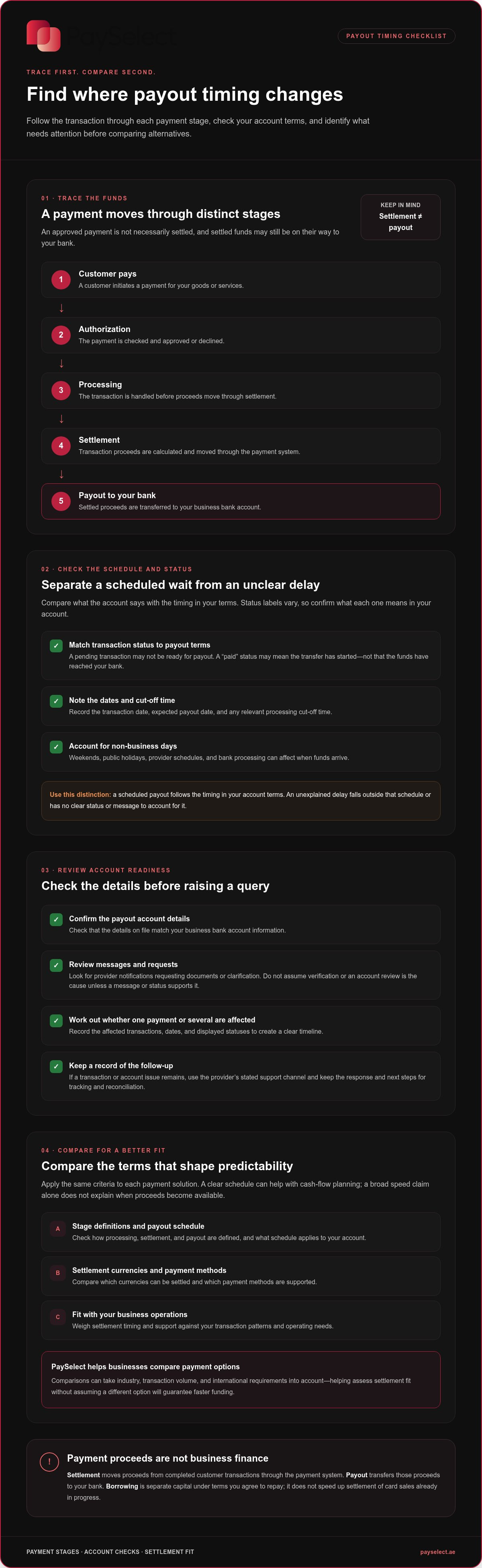
Customer pays → Authorization → Processing → Settlement → Payout to your bank
How a card payment becomes available to your business
Authorization checks whether a payment can proceed and approves or declines it. Processing is the handling of the transaction. These steps come before settlement, when proceeds are calculated and moved through the payment system. Payout is the transfer of those proceeds to your business bank account.
Provider payout schedules, processing cut-off times, non-business days, and bank processing can all affect when money arrives. The exact sequence and timing depend on your account terms, so use those terms rather than relying on a general timeline.
This distinction helps you locate a delay. If a transaction is still being processed, its payout may not yet be due. If it is marked as paid out, the transfer may have started but not reached your bank. Check the transaction status and payout details in your account to see which stage needs attention.
Payment settlement versus business finance
Settlement concerns money customers have already paid for your goods or services. Business finance, such as a loan or cash advance, provides access to capital under separate terms. It does not speed up settlement of card sales already in progress.
Start with the cash-flow need. If you are waiting for completed sales to reach your account, review settlement and payout timing. If you need capital beyond those proceeds, you are considering financing instead. Keeping the two separate makes it easier to assess how to get faster funding from your payment provider: focus on payment stages, account readiness, and the payout terms that apply to your transactions.
Why payment provider payouts may take longer than expected
A payout can arrive later than you expected without a payment being lost. The timing may follow the schedule in your account terms, and processing cut-off times can affect which payout cycle includes a transaction. Weekends and public holidays may also shift the expected arrival date, depending on the provider’s schedule and bank processing.
A scheduled payout follows the timing set out in your account terms. An unexplained delay falls outside that schedule or has no clear status or message to account for it. Use this distinction to decide whether to wait for the stated date or investigate further.
Check the payout schedule and transaction status first
Compare the transaction’s current status with the payout schedule in your account terms. Status labels vary, so check what each means in your account rather than treating “pending,” “processed,” and “paid” as interchangeable. A pending transaction may not be ready for payout. A paid status may mean the transfer has started, not that the funds have reached your bank.
Next, check whether the expected date falls on a weekend or public holiday. Note the transaction date, expected payout date, and any relevant cut-off time. This helps distinguish a schedule-related wait from a delay that needs follow-up.
Review account details and requests for information
Confirm that the payout account details match the business account information on file. Review account notifications and provider communications for requests for documents or clarification. Verification or an account review could affect a payout, but do not assume either is the cause without a message or status to support it.
Before raising a query, record the affected transactions, dates, and displayed statuses. A clear timeline helps explain what you have checked and whether one payment or several are affected.
If your review points to a transaction or account issue, share the relevant references and dates through the provider’s stated support channel. Keep a record of the response and next steps so you can track the case and reconcile the payout when it arrives.
If payout terms are difficult to assess, PaySelect’s payment gateway comparison can help you compare options against your business requirements. A comparison can clarify settlement fit, but it cannot guarantee a faster payout.
How to compare providers for faster, more predictable settlements
Compare the terms that determine when proceeds become available, not a broad claim that one option is “fastest.” Predictability may matter as much as speed: a clearly stated schedule can make cash-flow planning easier, even if another option describes its payout timing differently. Apply the same criteria to each payment solution, then weigh the results against your transaction patterns and operating needs.
Which settlement terms should your business compare?
Start by checking how each option defines processing, settlement, and payout, as well as the schedule stated for your account. Then review whether the supported payment methods and settlement currencies match how your customers pay and how your business receives funds. If you accept payments across currencies or markets, include those cross-border requirements. Otherwise, focus on your domestic needs.
Comparison area | What to assess
Payout schedule | Stated payout timing, cut-off rules, and how processing and payout dates are defined.
Settlement currencies | Whether the currencies relevant to your business are supported, and any account requirements tied to them.
Payment methods | Whether the methods your customers use are supported and how their settlement terms are described.
Status and support | How clearly you can track payout progress and find the right support route for a query.
Use the table as a working comparison, not a scorecard based on speed alone. A business with mostly local transactions may prioritise a clear payout schedule and useful status updates. A business receiving payments across currencies or markets may also need to understand how settlement terms fit those flows. PaySelect’s payment gateway options comparison considers requirements such as industry, transaction volume, and international needs.
When switching providers may not solve a payout delay
Before considering a move, establish whether the delay relates to a stated schedule, an account-specific review, or payout account details. Switching will not necessarily resolve an issue tied to your current account, and a different solution may have different terms rather than faster funding.
Also weigh the work involved in changing payment systems and how you will maintain payment continuity during the transition. Compare the full fit, including settlement terms, supported methods, currencies, and account needs. If you are researching how to get faster funding from your payment provider, this evidence-led comparison can help distinguish a fixable account issue from a genuine mismatch in payout terms.
How to troubleshoot a delayed payment payout step by step
Work through the issue in order before assuming a payout is lost or changing payment arrangements. A structured check helps identify what is affected, gives you useful information to share, and creates a clear record for reconciliation.
Check your account terms.
Review the stated payout schedule and any relevant cut-off times. Compare the expected date with the date shown in your account, allowing for applicable non-business days.
Identify the affected transactions.
Note the transaction references, dates, amounts, and status displayed for each payment. Check whether the issue affects one transaction, a particular payout, or a wider group.
Verify the payout details.
Confirm that the account information on file matches the business account details. Review provider messages for requests for documents or clarification, and check whether any action is outstanding.
Contact support if the payout remains unexplained.
Use the support route stated in your account or provider communications, and provide the information you have gathered.
Prepare a clear payout support request
Make the case easy to review. Include transaction references, relevant dates, the expected payout date, and the status shown in your account. Attach screenshots that show the issue, taking care not to share unnecessary sensitive information. Briefly explain the business impact and what you have already checked. Ask what caused the delay, what action is needed next, and whether an expected resolution timeline is available.
Keep the case reference and provider replies together. When you receive an update, record what changed and when the funds arrive. This record helps your team match the payout to its transactions and resolve later reconciliation questions more efficiently.
Reduce repeat delays through better payment operations
Assign someone to review payout notifications and reconcile incoming funds against payment reports. Keep business account information current, and respond promptly when the provider requests documents or clarification. These habits can help prevent avoidable account or information issues from lingering.
Use reports to compare expected and actual payout dates over time. Look for recurring timing differences before treating an isolated delay as a pattern. If the evidence points to a mismatch between your business needs and the settlement terms, a neutral comparison can help you assess alternatives without assuming a change will guarantee faster payouts.
To assess payment solutions against your business requirements, explore PaySelect’s payment gateway comparison. It helps you compare settlement fit using factors such as industry, transaction volume, and international requirements.
How PaySelect helps you find a better-fit payment solution
Payment comparisons are most useful when they start with how your business operates. PaySelect’s matching tool considers your industry, transaction volume, and international requirements to help you assess relevant options. That context makes it easier to compare settlement terms against your actual payment flows instead of relying on a general claim about speed.
A comparison can help you understand whether a solution’s payout schedule, supported payment methods, and account requirements fit your needs. It cannot guarantee faster payouts. The aim is to make the differences clearer so you can judge settlement fit with better information.
Match payment options to your operating requirements
Your business type and transaction volume help shape which payment options are relevant to compare. If you collect payments across currencies or markets, international requirements matter too. Include cross-border settlement needs in your assessment when they apply. If your collections are domestic, focus on the terms and payment methods relevant to those transactions. This keeps the comparison practical and focused.
Choose the next step with clearer information
Take your key criteria into the comparison: payout schedule, how processing and payout are defined, supported methods and currencies, account requirements, and the clarity of payout updates. PaySelect provides independent payment advisory and payment infrastructure consulting for larger organizations with broader requirements. Its comparison data is transparent, and referrals to payment providers may generate success-based fees.
If you are assessing how to get faster funding from your payment provider, use these criteria to compare settlement fit rather than assume a new option will pay out sooner. Compare payment options for your business.
Make payout timing easier to plan
Clearer funding starts with knowing which payment stage is taking time. Check your account’s payout terms and transaction status before treating an arrival date as a delay. If a payout falls outside the stated schedule, gather the transaction details, verify your account information, and raise a focused support request.
When comparing solutions, look beyond claims of speed. Consider the payout schedule, payment methods, settlement currencies, account requirements, and how clearly payout updates are communicated. The right fit depends on your business needs. A comparison can help you assess settlement terms, but it cannot guarantee faster payouts.
PaySelect matches payment options to factors including your industry, transaction volume, and international requirements, and provides comparison and advisory support across payment solutions. Referral fees are success-based, and comparison information is presented transparently. To explore options for your business, compare payment gateway options.
With a clearer view of how to get faster funding from your payment provider, you can investigate delays with confidence and make better-informed decisions about your payment setup.
Frequently Asked Questions
How long does it take for a payment provider to pay out funds?
There is no single payout timeline that applies to every business. Timing depends on the schedule and terms for your account, the transaction’s status, processing cut-off times, non-business days, and bank processing. Check your account terms for the expected payout date, then compare it with the transaction status. If the stated date has passed without an explanation or update, gather the details and contact support.
Why is my payment provider holding my funds?
A delay does not automatically mean your funds are being held. First check whether the transactions are still pending, whether the payout date matches your account schedule, and whether your account has a notification or request for information. Verification or an account review may be possible factors, but do not assume either is the cause without evidence. Confirm your payout account details, review provider messages, and ask support for the reason if the status remains unclear.
Can I get my payment provider to release funds faster?
You can ask the provider to explain the payout status and whether any action is needed, but an earlier release is not guaranteed. Check the terms and expected date, confirm your business account details, and look for outstanding information requests. If the payment appears overdue, contact support with transaction references and dates. Understanding how to get faster funding from your payment provider starts with identifying the stage causing the delay, rather than assuming a release can be accelerated.
Does changing payment providers make payouts faster?
Not automatically. A different provider may offer different payout schedules, payment methods, currencies, or account requirements, but switching may not resolve an account-specific review or incorrect bank details. Identify the cause of the current delay first. If you compare alternatives, weigh their stated settlement terms against your business needs and consider the work involved in changing systems and maintaining payment continuity. Compare fit, not just headline claims about speed.
What is the difference between payment settlement and a business loan?
Payment settlement concerns proceeds from customer transactions your business has accepted. A payout transfers those proceeds to your business bank account under the terms of your payment arrangement. A business loan is separate financing that provides access to capital under its own repayment terms. If you are waiting for sales revenue, review settlement and payout status. If you need additional capital beyond completed sales, you are considering business finance instead.
What information should I give my payment provider about a delayed payout?
Share the affected transaction references, transaction dates, expected payout date, and the status displayed in your account. Include relevant screenshots and a brief description of the business impact, along with the checks you have already completed, such as verifying account details. Ask what caused the delay, what action is required, and whether an expected timeline is available. Keep the case reference and updates so you can track the resolution and reconcile the funds.
Disclaimer
This content is for informational purposes only and should not be considered financial, legal, or regulatory advice. Payment provider availability, pricing, and approval processes vary depending on individual business circumstances. PaySelect does not guarantee provider acceptance or specific outcomes. Businesses should conduct their own due diligence before entering into any agreements.
Empowering businesses to achieve greater growth