


Payment reconciliation breaks down when the same payment appears differently across sales records, processor reports and bank statements. To learn how to simplify payment reconciliation, match transactions using consistent references, account for timing and fee differences, and investigate exceptions before finalizing balances.
Reconciliation gets harder as payments move across channels and systems. A settlement may differ from the original transaction total after fees, refunds or chargebacks, while missing or inconsistent references make payments harder to trace. This guide explains how to align records, document adjustments, close out balances and investigate differences between systems. A consistent workflow and a payment setup with clear reporting can reduce manual checks and help finance teams see what has been received, paid out or remains unresolved.
Key Takeaways
• Bring transaction, settlement, bank and invoice records into a consistent workflow so matches are easier to trace.
• Record fees, refunds and other adjustments clearly before confirming receivables, payables and closing balances.
• Trace mismatches across card reports, payment software and ledger entries to distinguish timing differences from errors.
• Use automation to match routine transactions and flag exceptions, then assess whether payment advisory or comparison support fits your setup.
Recording Adjustments and Finalising Balances
A reliable close connects sales, settlement and accounting records through a consistent workflow. To simplify payment reconciliation, match each payment to its source, explain adjustments and resolve discrepancies before confirming balances.
Collecting and Matching Payment Records
Bring transaction logs, processor reports, bank statements, invoices and supplier records together before matching. This gives the finance team visibility across payment channels. Match records using transaction IDs, references, amounts and dates, then group them by payment batch and settlement. For accounts receivable, connect customer payments to sales invoices and record the amount received. For accounts payable, match vendor invoices to payment records and bank outflows. Bank feeds and payment gateway reports can supply data to accounting platforms such as Xero or MYOB, though the integration method depends on the systems in use. Review unmatched entries instead of assuming each one is an error.
Adjustments and Balance Verification
Adjustments explain why recorded revenue differs from the amount deposited or owed. Record each correction against the relevant transaction and account, with a reason and supporting evidence. For example, record a processor fee separately from the gross sale instead of reducing the sale without explanation. In a multi-client workflow, keep each business’s records, approvals and reports distinct, even when teams use the same accounting platform. Before finalising, check that receipts, payment batches, supplier payments and adjustments agree with bank statements and ledger balances. Document unresolved discrepancies for review rather than forcing a balance. A consistent close helps simplify payment reconciliation across teams and systems.
Fees, Refunds, and Partial Payments
Record fees, refunds, chargebacks and partial payments as separate entries linked to the original transaction or invoice. This keeps the gross sale visible and explains the net settlement. Record a refund against the customer’s original payment. Track a chargeback separately with its status, and apply a partial payment to the invoice while leaving the unpaid balance open. Compare fees with processor reports, then post them to the appropriate accounting category. The European Union describes e-reconciliation as the electronic sending of balance and payment information from providers to beneficiaries for bookkeeping. Before closing, confirm that each adjustment has a reason, supporting evidence and the correct account.
Challenges of Reconciling Payments Across Systems
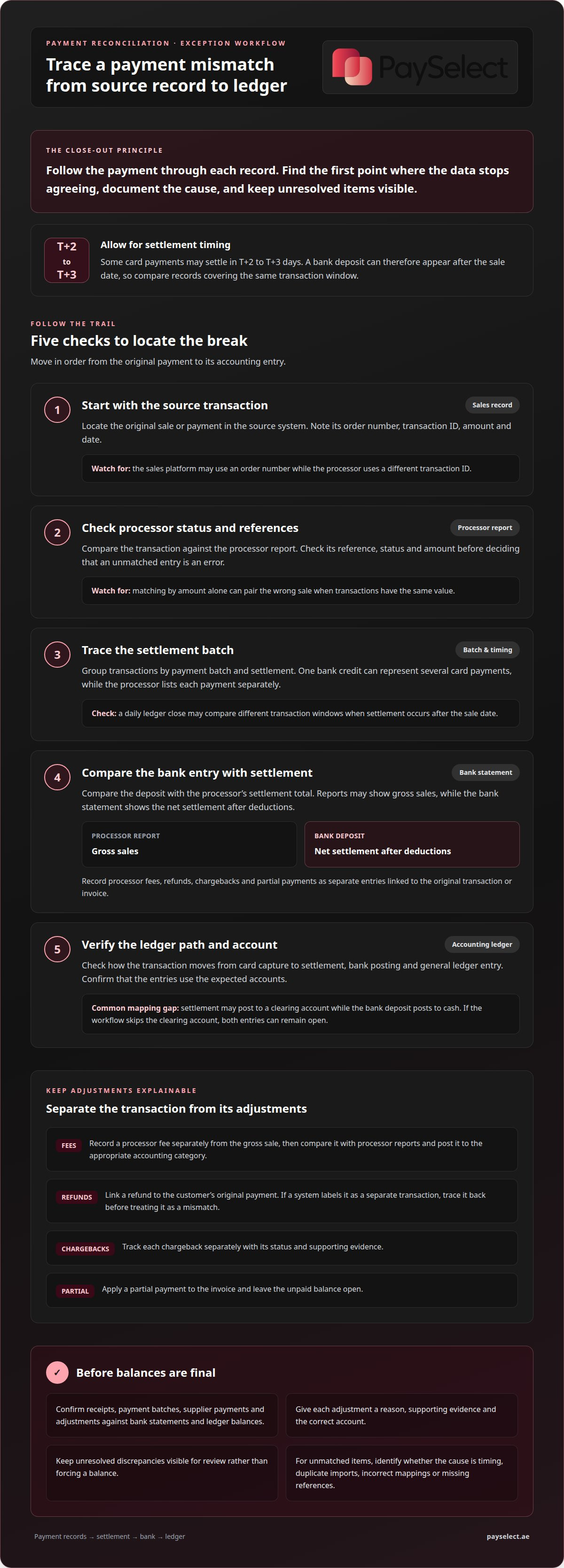
A payment may have different references in a sales platform, processor software and bank statement. A credit card sale, for example, may use an order number internally while the processor report uses a transaction ID. If the general ledger imports only one reference, a valid entry can appear unmatched. Matching by amount alone can also pair the wrong sale when transactions have the same value.
Timing creates another gap. Card payment settlement timing varies by provider and other factors; some card payments may settle in T+2 to T+3 days, so a bank statement may show a deposit after the sale date. A daily ledger close can therefore compare different transaction windows. Batch settlement adds complexity: one bank credit can represent several card payments, while the processor lists each transaction separately. Comparing individual sales directly with the combined deposit will not tie out correctly.
Credit card reports may show gross sales, while the bank statement shows the net settlement after deductions. If accounting software imports the net amount as revenue, the general ledger understates sales and conceals the difference. Refunds, chargebacks and duplicate records can cause similar conflicts. Trace each item to its transaction status and source record before treating a mismatch as a posting error.
System design can cause errors even when a payment is valid. A payment gateway, for example, may label a refund as a separate transaction, while accounting software expects it to reduce the original invoice. Currency fields, date formats and inconsistent customer references can also prevent automatic matching. Missing data is especially disruptive when software rules require an exact reference.
Ledger mapping matters too. A processor’s settlement entry may post to a clearing account, while the bank deposit posts to cash. If the accounting workflow skips the clearing account, both entries can remain open despite representing the same funds. Review the transaction path from card capture to settlement, bank posting and general ledger entry to find where the records diverge.
To resolve cross-system differences, identify the first point where the data stops agreeing. Check the source transaction, processor status, settlement batch, bank entry and ledger account in sequence. This helps distinguish timing gaps from duplicate imports, incorrect mappings or missing references. Keep the unmatched item visible until you have documented its cause and correction, rather than forcing the accounts to balance.
Automating Payment Reconciliation
Automation connects transaction data, matching rules and exception workflows across payment systems. A clear process helps finance teams reduce repetitive checks and keep unresolved items visible.
Manual and Automated Reconciliation
Manual reconciliation means comparing reports, statements and ledger entries by hand. Automated reconciliation applies rules to match records and flag exceptions. Spreadsheets may work for straightforward workflows, but repeated copying makes errors harder to spot as channels expand. Automation can simplify payment reconciliation by processing routine matches and sending uncertain items for review. Staff still need to assess exceptions, approve adjustments and confirm closing balances.
Reconciliation Rules and Fundamentals
Payment reconciliation compares internal transaction records with external payment and bank records to confirm balances and identify differences. It helps finance teams spot incomplete records and clarify reported revenue. For UAE businesses, reconciliation supports accurate accounting and VAT records, but does not determine the VAT treatment of a supply. Apply the appropriate treatment to each transaction and retain relevant invoices and supporting records.
Tool costs depend on features, transaction volume, integrations, user access and implementation needs. Compare the full operating model, including the time needed to maintain matching rules and review exceptions, rather than looking at subscription cost alone.
Assess automation by checking whether it can collect data from each source, standardise formats, match reliable references and preserve an audit trail. Test rules with varied transaction examples, including duplicates and incomplete records. Set review thresholds so uncertain matches are not posted automatically. If you are considering how to simplify payment reconciliation, start with a specific pain point, such as repeated manual entry or slow exception review.
A practical workflow collects records, standardises fields, matches transactions, investigates exceptions, posts corrections and reports balances. Common errors include missing entries, duplicate imports, amount mismatches and unexplained transactions. Reduce these risks with consistent references, controlled access and documented exception handling.
Reconcile regularly, often daily or weekly, based on transaction volume, settlement patterns and finance-team capacity. A set schedule helps identify timing differences and posting errors before they accumulate across reporting periods.
How PaySelect Can Help
PaySelect helps businesses assess whether their payment setup supports clear, manageable reconciliation. Reconciliation depends partly on how transaction, settlement and fee information flows from payment providers into accounting records. Comparing provider capabilities can help identify reporting formats, integrations or settlement processes that better fit your finance workflow.
Reviewing your current setup does not always mean switching providers. PaySelect’s payment pricing comparison helps you assess commercial terms alongside operational requirements. Consider how reports identify individual transactions, how settlements are presented, and whether fees and adjustments can be traced. These details affect how easily finance teams can explain differences between processor records and bank balances.
For online sales, a payment gateway influences the transaction information available for reconciliation. PaySelect’s payment gateway comparison helps businesses assess options against their payment and integration requirements. A retailer taking payments through several channels may also need to compare how each provider presents transaction and settlement data. The aim is a payment setup that supports consistent records, not simply another tool.
Businesses with international collections or payouts should also consider how payment routes affect settlement records and currency reporting. PaySelect’s comparison platform can help businesses compare payment providers. For in-person payments, PaySelect provides POS payment solution comparisons. Each choice can shape the reports and records the finance team later reconciles.
Before evaluating options, define the reconciliation problem: missing transaction references, settlement timing, separate channel reports or unclear fee records. Then compare payment solutions against those needs and your accounting workflow. This focuses the decision on practical fit and gives finance teams clearer criteria for assessing payment operations.
For help discussing your payment requirements, contact PaySelect.
Frequently Asked Questions
What Can Be Automated?
Automation can collect payment files, standardise formats, match transactions, detect duplicates, route exceptions, update statuses and prepare reports. For example, a rule can match a gateway payout with grouped sales using a batch reference, then flag a missing transaction for review. Leave approval of unusual adjustments to an authorised team member, and use access controls to limit who can change matching rules.
What is reconciliation software?
Reconciliation software brings financial records together and helps match related transactions. It can connect payment systems, bank data and accounting platforms, then apply rules to identify matches or exceptions. An online retailer, for example, might use it to compare checkout activity with processor payouts. Useful capabilities include configurable rules, exception tracking, audit trails and integrations that fit existing workflows.
What are best practices for matching invoices, payouts, and bank transactions?
Use consistent references across invoices, payment records and payout files, and match records using more than the amount alone. For example, combine the invoice number, transaction reference and payment date to distinguish transactions with the same value. Keep grouped payouts linked to their underlying invoices, record who approved corrections, and review unmatched items regularly so they do not go unnoticed in later reporting periods.
How much do payment reconciliation tools and automation cost?
Costs depend on features, transaction volume, integrations, user access and implementation needs. Compare the full operating model, including the time needed to maintain matching rules and review exceptions, rather than considering subscription cost alone.
How can bank feeds and payment gateways be integrated for reconciliation?
Bank feeds and payment gateway reports can supply data to accounting platforms such as Xero or MYOB. The integration method available depends on the systems in use.
Disclaimer
This content is for informational purposes only and should not be considered financial, legal, or regulatory advice. Payment provider availability, pricing, and approval processes vary depending on individual business circumstances. PaySelect does not guarantee provider acceptance or specific outcomes. Businesses should conduct their own due diligence before entering into any agreements.
Empowering businesses to achieve greater growth
