If a checkout asks for your CVV, does that mean your card is safe? Not on its own. If you’re asking what is a cvv and why is it important for security, it’s the card’s verification code, used as an extra check for some online or phone payments when the physical card isn’t presented. It’s different from your card number and PIN, and it can help verify that the buyer has access to the card. But it can’t prove who’s using it or stop every unauthorised transaction.
That distinction matters for customers and businesses alike. A CVV is useful, but treating it as a complete security solution can leave important gaps. This guide explains when merchants may request the code, what it can and can’t protect against, and practical ways to handle payment details more responsibly.
Payment security also depends on the wider checkout and the capabilities of the payment provider, which can vary. We’ll look at how these choices fit together and how businesses in the UAE can compare gateway options. PaySelect is an independent comparison and referral platform, not a payment processor. It helps merchants explore solutions that match their requirements.
Key Takeaways
• Understand what is a cvv and why it is important for security, including the role it plays in some remote card payments.
• Distinguish a CVV from a card number, PIN, and additional authentication so you know what each check can and cannot establish.
• Use practical steps to protect card details before, during, and after an online or phone purchase.
• Consider how payment-provider capabilities fit your business’s wider gateway setup, and compare options against your requirements.
• See how PaySelect helps UAE merchants explore payment solutions through a comparison and referral platform.
What Is a CVV, and Where Does It Fit in a Card Payment?
A CVV is a short card verification code, separate from the card number, that can provide an extra check during some payments made without presenting the physical card. The code is often requested for online or phone purchases, where the merchant cannot see the card. The exact name varies: you may see CVV, CVC, or “card security code.” These terms generally refer to a similar type of code, though naming conventions differ across card schemes and issuers. The Card security code overview explains the different terms and their role in card-not-present transactions.
In a remote checkout, the customer enters the code when the payment form requests it. The payment provider may use it as one piece of information when assessing the transaction. It is not the card number, which identifies the payment card, and it is not a standalone approval of the buyer or purchase. For anyone asking what is a cvv and why it is important for security, the key point is that it adds a check, not certainty.
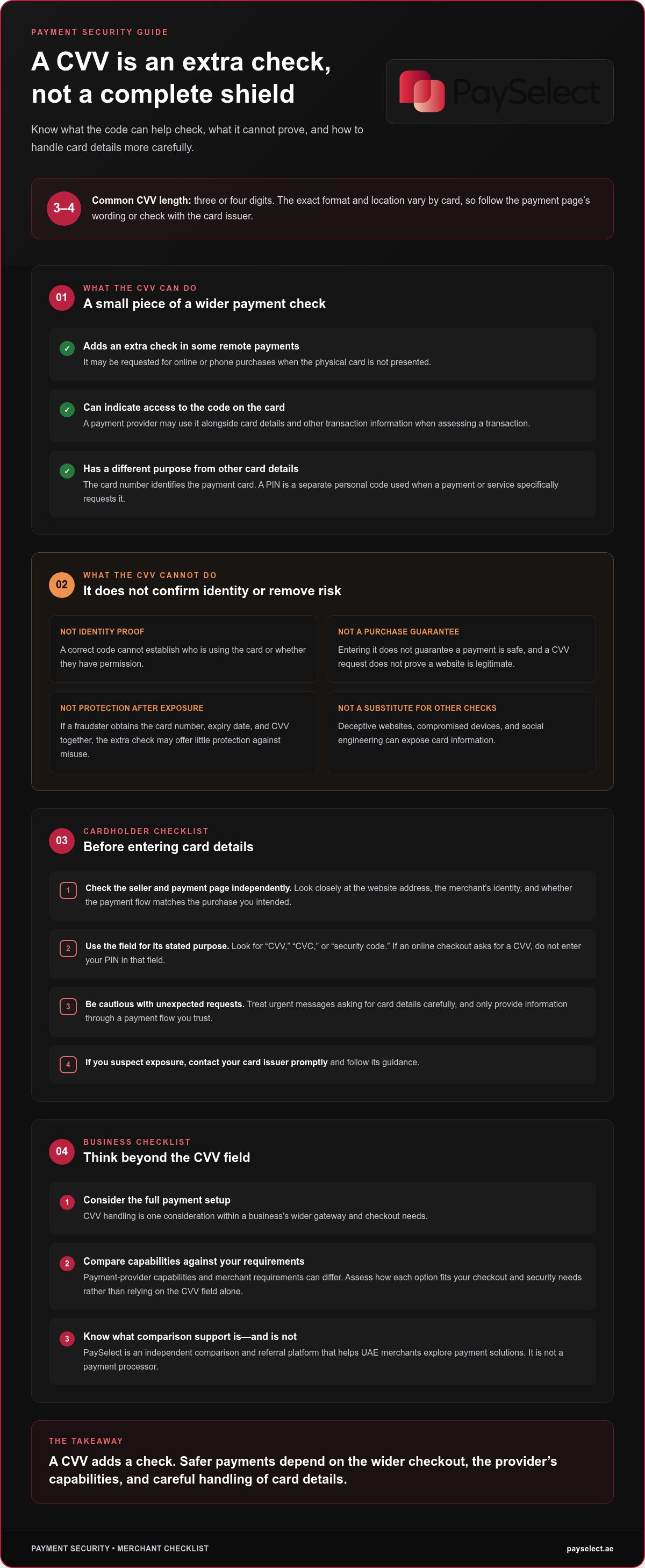
CVVs are commonly three or four digits, but the precise format and placement can vary. Checkout labels can differ too, so follow the wording on the payment page rather than assuming every card uses the same name or layout.
Where Can You Find the CVV on a Payment Card?
Check the printed details on your card. The code is often a three-digit number on the signature panel on the back; some card designs place a four-digit code on the front. These are common patterns, not a guarantee for every card. If the location is unclear, consult information from your card issuer instead of guessing or entering another number.
The CVV is printed, not embossed like some card details may be. It can be small and easy to overlook, especially on a card with a distinctive design. On a checkout page, look for a label such as “CVV,” “CVC,” or “security code.” Don’t mistake the expiry date or part of the card number for this code.
Is a CVV the Same as a PIN?
No. A CVV is generally used as an additional check in some card-not-present payments. A PIN is a separate personal code used when a payment or service specifically prompts for it, such as at a cash machine or payment terminal. The payment context determines which information is requested. If an online checkout asks for a CVV, don’t enter your PIN in that field.
Neither code, by itself, proves that a transaction is legitimate. Someone may have access to card details without being the cardholder, and a correct code cannot confirm the buyer’s identity or their reason for making a purchase. Treat each requested detail according to its purpose, and only provide it through a payment flow you trust.
How Does a CVV Add a Layer of Payment Security?
In a remote transaction, a CVV can give the payment provider one more data point to assess alongside the card details and other transaction information. A match may support a check that the person entering the details has access to the code printed on the card. It doesn’t establish who that person is, why they’re making the purchase, or whether the seller is genuine.
Understanding what is a cvv and why it is important for security means seeing both sides: the code can make a payment harder for someone with incomplete card details, but it isn’t a complete defence. If a fraudster obtains the card number, expiry date, and CVV together, the extra check may offer little protection against misuse. A CVV is not a password or identity check, and entering it does not guarantee that a payment is safe.
Why Do Online Merchants Ask for a CVV?
A merchant may request the code as an additional input for a card-not-present payment. The merchant collects the information through its checkout, while the payment provider and card issuer may be involved in assessing and authorising the transaction. A CVV request is not itself an approval, and its presence doesn’t prove that a website is legitimate. Check the seller and payment page independently before entering card details.
What a CVV Cannot Protect Against
A code can’t protect details that have already been exposed. A deceptive website may collect the card number, expiry date, and CVV by posing as a trusted merchant. A compromised device could expose information as it’s entered, while social engineering may persuade someone to share it directly. If a fraudster obtains the CVV alongside other card details, they may try to use those details in a remote payment.
A CVV can add a check, but it doesn’t prevent all fraud or remove all payment risk. The outcome of a transaction depends on more than whether the code was entered correctly. A provider or issuer may consider other information and checks, and a CVV alone can’t determine whether the person using the card has permission. Don’t treat a checkout that asks for a CVV as proof that it has strong security, or assume a successful payment means every detail was safe.
For cardholders, the practical response is to be selective about where card information goes. Look closely at the website address, the merchant’s identity, and whether the payment flow matches the purchase you intended. Be cautious of unexpected messages or urgent requests for card details. If you suspect your information has been exposed, contact your card issuer promptly and follow its guidance.
For businesses in the UAE, CVV handling is one consideration within the wider payment setup. Gateway capabilities and merchant requirements can differ, so compare how each option fits your checkout and security needs rather than relying on the CVV field alone. Compare payment gateway options as part of that broader assessment.
CVV, PIN, and Other Checks: What Is the Difference?
Card payments can involve several details and checks, each serving a different purpose. Knowing which is which helps customers avoid entering the wrong information and helps businesses explain their checkout clearly. Terms such as CVV, CVV2, CVC, and card security code can vary by card network or issuer, but they generally refer to the card’s verification code.
CVV or similar code: Provides a card-detail check in some remote transactions. It doesn’t prove the buyer’s identity or authorise a payment by itself.
PIN: A personal code used when a payment or service specifically requests it. It doesn’t confirm that an online seller is trustworthy.
Card number: Identifies the payment card or account details used to initiate a card transaction. It doesn’t prove the person entering it is authorised to use it.
Additional authentication: Adds a separate verification step to some transactions. It doesn’t make every transaction risk-free or follow the same process every time.
Card-detail verification checks information associated with the payment card; stronger customer authentication adds a separate step to help verify the person or payment. The exact checks depend on the transaction and payment setup, so a checkout may not ask every customer for the same information.
CVV vs. Card Number and Expiry Date
The card number identifies the card details being used, while the expiry date indicates the period for which the card is valid. A CVV is a separate verification input that may be requested for a remote payment. Merchants don’t all request the same details, and the fields shown can vary by checkout.
These details serve different purposes, but obtaining them together can create greater exposure. For example, if someone gets a card number, expiry date, and CVV through a deceptive payment page, they may have enough information to attempt unauthorised purchases. Treat each field as sensitive, and don’t assume that one extra code makes the rest safe to share.
CVV vs. Additional Transaction Authentication
Entering a printed code is not the same as completing an additional authentication step. That extra step may involve a separate confirmation through a process connected to the card issuer, but the method and whether it appears can vary. Not every transaction follows identical steps. The key distinction in understanding what is a cvv and why it is important for security is that a CVV checks card details, while additional authentication provides another layer of verification.
For businesses, these differences matter when reviewing checkout requirements and gateway capabilities. A payment flow should make clear which detail it is requesting and why, without treating any single check as a complete security measure. Comparing gateway options can help businesses in the UAE consider how payment features fit their wider setup.
How Can Cardholders and Merchants Handle CVV Details Safely?
Safer card payments depend on the whole process, not just the code entered at checkout. Cardholders can reduce avoidable exposure by checking where they’re paying and how they respond to requests for sensitive information. Businesses, in turn, need clear procedures for handling payment data and should understand how their payment setup works.
Before, during, and after a remote purchase, use these practical steps:
Before
Check the merchant’s identity and the payment page address. Be cautious of unexpected links, unusual payment requests, or a page that doesn’t match the purchase you intended.
During
Enter card details only through a payment flow you trust. Don’t send them in unsolicited messages, and never provide a PIN or one-time authentication code in place of a CVV.
After
Keep an eye on your card activity. If you think your card details may have been exposed, contact your card issuer promptly and follow its instructions.
Practical Steps for Cardholders
A familiar logo alone doesn’t establish that a checkout is genuine. Check the website address and merchant context before entering card details, especially if you arrived through a message or an unexpected offer. If the request seems suspicious, stop rather than sharing the code to complete the purchase. For questions about possible exposure or unauthorised activity, your card issuer can explain what steps to take.
What Merchants Should Consider When Handling CVV
Merchants should follow their payment provider’s instructions for collecting and handling card details, and review applicable security standards as part of their payment operations. Capabilities and data flows can differ between gateways, so don’t assume every provider handles information in the same way. Make responsibilities clear to staff and avoid collecting details through informal channels such as email or chat.
Storage rules need particular care. Under PCI DSS Requirement 3.2, merchants and service providers must not store a CVV after a transaction is authorised. This applies even if the customer gives permission, and encryption doesn’t make post-authorisation storage acceptable. The code must not be retained for recurring or card-on-file transactions either. Businesses should review current PCI DSS requirements and their provider’s guidance when designing payment and record-keeping processes.
For a business, knowing what is a cvv and why it is important for security also means recognising where its role ends. The code is a sensitive payment detail, not a substitute for a secure checkout, sound data-handling practices, or a suitable gateway setup. Compare payment gateway options to explore how different solutions may fit your business’s payment requirements.
How Payment Providers Fit Into CVV Security for Businesses
A CVV is one element of a broader payment setup. For businesses in the UAE, the right configuration depends on how customers pay, which channels the business supports, and what its day-to-day operations require. Payment providers can differ in their capabilities and processes, so assess each option against your business needs instead of assuming every gateway handles payment security in the same way.
Start by mapping your payment journey. An online retailer taking remote card payments may have different requirements from a business accepting payments in person or serving customers internationally. Consider the payment methods customers use, the channels you need to support, and the transaction volumes you expect. Then weigh provider capabilities against those priorities. A feature matters when it fits your checkout and operating model, not simply because it appears on a feature list.
Questions Businesses Can Consider About Payment Security
Review your payment channels, customer payment preferences, transaction patterns, and operational requirements. Consider how a potential provider’s security capabilities fit those needs, and identify the responsibilities your team will manage. This practical review can help you compare payment gateway options without treating any single security feature as universal or sufficient on its own.
For businesses asking what is a cvv and why it is important for security, the answer can help frame these discussions: understand the code’s role, then consider how it fits within a wider payment flow. Compare providers based on what matters to your business, including payment methods, sales channels, and international requirements, rather than relying on one feature to address every risk.
How PaySelect Helps Merchants Explore Payment Providers
PaySelect’s “Take the Test” questionnaire typically takes less than two minutes. It uses merchant answers about factors such as industry, transaction volume, payment methods, and international requirements to match businesses with relevant providers for further exploration. Merchants can use the questionnaire and explore providers without registration, making it a practical starting point for assessing a payment setup. The comparison tool and questionnaire are free for merchants.
Business data is shared only with matched providers after the merchant gives explicit consent. PaySelect’s data handling complies with UAE data-protection regulations. If a business decides to proceed, the chosen provider handles onboarding, the ongoing relationship, support, and settlement directly. PaySelect can assist with collecting initial KYC documents, but it does not perform onboarding. The comparison process helps clarify which options align with a business’s needs, while the final choice remains with the merchant.
Use the results as a starting point for evaluating how a potential solution fits your payment channels, operating needs, and security responsibilities. A considered setup can support a smoother customer journey and give your team a clearer basis for future payment decisions.
Make Your Payment Setup Work for Your Next Stage
Knowing what is a cvv and why it is important for security can help you ask sharper questions about your payment setup. The next step is to connect those questions to your business plans: how customers prefer to pay, which sales channels you want to support, and what your team needs from a gateway as operations grow. A setup that fits today should also make it easier to evaluate future requirements without relying on one security check to do everything.
For businesses in the UAE, comparing gateway solutions can bring those requirements into focus. Consider how each option aligns with your customer journey and operational needs, then use that comparison to guide your next decision. PaySelect helps merchants explore payment solutions through a provider-comparison questionnaire, with no obligation to move forward.
Ready to explore potential matches for your business? Explore payment gateway options with PaySelect, and take a practical step toward a payment setup that supports your plans. The free comparison tool can help you evaluate relevant options with greater clarity.
Frequently Asked Questions
What does CVV stand for?
CVV stands for Card Verification Value. It’s a code associated with a payment card and commonly requested for some remote transactions, such as an online purchase. Other card networks or issuers may use labels such as CVC or card security code, so the wording on a payment form can differ. Whatever the label, the code is separate from the card number and PIN.
Does a CVV have three or four digits?
A CVV is commonly three or four digits, depending on the card. Check the code printed on your own card or use your card issuer’s official guidance if you can’t locate it. Don’t assume every card has the same length or placement, and don’t treat the number of digits as a measure of how secure the card is. The code’s format alone doesn’t indicate a transaction’s safety.
Can someone use my card without the CVV?
Possibly. Whether a payment can proceed without a CVV depends on the merchant, payment provider, card issuer, and transaction context. A checkout that doesn’t request the code doesn’t mean a card can’t be misused. Knowing what is a cvv and why it is important for security also means recognising its limits. If card details may have been exposed, contact your issuer and review recent account activity.
Is it safe to give a CVV over the phone?
It depends on who is asking and why. Don’t share card details with an unsolicited caller or through a channel you can’t verify. If you’re making a purchase by phone, initiate the call using a trusted contact method and make sure the request relates to that purchase. Never give a PIN or one-time authentication code as a substitute for a CVV, even if the caller says it’s needed.
Can a CVV change or expire?
A printed CVV is associated with a particular card, so it may change if the card issuer replaces or reissues that card. Issuers may handle replacement cards differently, so don’t assume a universal process. If the code is unreadable or you’ve received a replacement card, follow the issuer’s official instructions. Don’t guess the digits or share other security information to get help with the card.
What should I do if my CVV is exposed?
Contact your card issuer promptly through an official channel, explain what may have been exposed, and follow its instructions. The issuer can advise whether to block or replace the card. Review recent transactions and continue monitoring activity. If the incident also exposed login details for an account, change those credentials through the official service. Acting quickly helps you respond, but it can’t guarantee that losses will be prevented or a dispute resolved.
Disclaimer
This content is for informational purposes only and should not be considered financial, legal, or regulatory advice. Payment provider availability, pricing, and approval processes vary depending on individual business circumstances. PaySelect does not guarantee provider acceptance or specific outcomes. Businesses should conduct their own due diligence before entering into any agreements.
Empowering businesses to achieve greater growth