
What if simplifying payments doesn’t mean replacing your gateway or processor? If you’re asking what is a payment orchestration platform, the key is in the word “orchestration”: it coordinates payment services and routes transactions between them, rather than processing payments itself. That distinction matters when online, in-person and cross-border payments start to feel like separate systems to manage.
Gateways, processors and orchestration platforms can sound interchangeable, but they play different roles. The right setup depends on how your business takes payments, where it operates and how much complexity it needs to manage.
This guide explains what orchestration does, how it differs from gateways and processors, and when it may help bring payment operations together. You’ll also learn what to assess before considering a platform, including your channels, provider setup and visibility into costs. PaySelect helps businesses compare payment options and provides payment infrastructure advisory for large organisations.
Key Takeaways
• Get a clear answer to what is a payment orchestration platform and how it coordinates payment connections and workflows.
• Follow the transaction journey from checkout to payment services, and see how routing may fit into the process.
• Understand the typical roles of orchestration platforms, gateways, processors and payment service providers, while recognising that their offerings can overlap.
• Assess whether multiple channels, markets, providers or reporting needs make an orchestration layer worth considering, or whether a simpler setup may be enough.
• See how PaySelect’s Take the Test tool uses your industry, transaction volume and international requirements to match your business with relevant payment options.
What Is a Payment Orchestration Platform, and What Problem Does It Solve?
A business can accept payments online, in person and across borders, yet each route may involve different systems, provider relationships and reports. The challenge isn’t simply taking a payment. It’s coordinating the moving parts and understanding how they fit together across channels, markets or business units.
A payment orchestration platform is a software layer that coordinates connections and payment workflows between a business and its payment services. It sits within the wider payment setup and helps manage how payment-related systems interact. The connections and functions available depend on the platform and how the business configures it. For a broader overview of the concept and its components, see What is Payment Orchestration.
Orchestration is not another name for payment processing, acquiring or gateway provision. Processing handles transaction information; acquiring relates to the services that enable a merchant to accept card payments; and a gateway is one part of the acceptance setup. An orchestration platform coordinates connections or workflows around these services. It doesn’t automatically replace them or perform every role itself.
How Is Payment Orchestration Different from a Payment Gateway?
A gateway typically provides a connection for payment information to move between checkout and payment services. Orchestration works at a broader coordination level, bringing together connections or workflows that may involve more than one service. Businesses reviewing their acceptance setup can compare payment gateway options as one part of the picture. The two categories aren’t interchangeable, and platform capabilities can differ.
Which Business Payment Challenges Can It Address?
Orchestration may be relevant when separate payment arrangements make routine operations harder to manage. An online store and physical locations might use different systems, while international sales can add provider relationships. Teams may then need to combine reports manually or trace a transaction across disconnected tools. A coordination layer may help organise those connections and workflows, depending on the systems involved.
Fragmented reporting
Payment activity spread across systems can make it harder to build a consistent view of transactions.
Channel complexity
Different checkout experiences may require separate connections and processes.
Multiple provider relationships
Teams may need to manage different integrations, operational processes and reporting formats.
These examples describe operational friction, not guaranteed savings, higher approval rates or fewer failed transactions. Whether orchestration is useful depends on your systems, business needs and transaction flows. A business with one main channel and a straightforward setup may gain little from adding another coordination layer. Start by mapping where payments begin, which services handle them and where reporting or reconciliation takes extra work. That gives you a practical basis for deciding whether orchestration addresses a real need.
How Does a Payment Orchestration Platform Work Behind a Transaction?
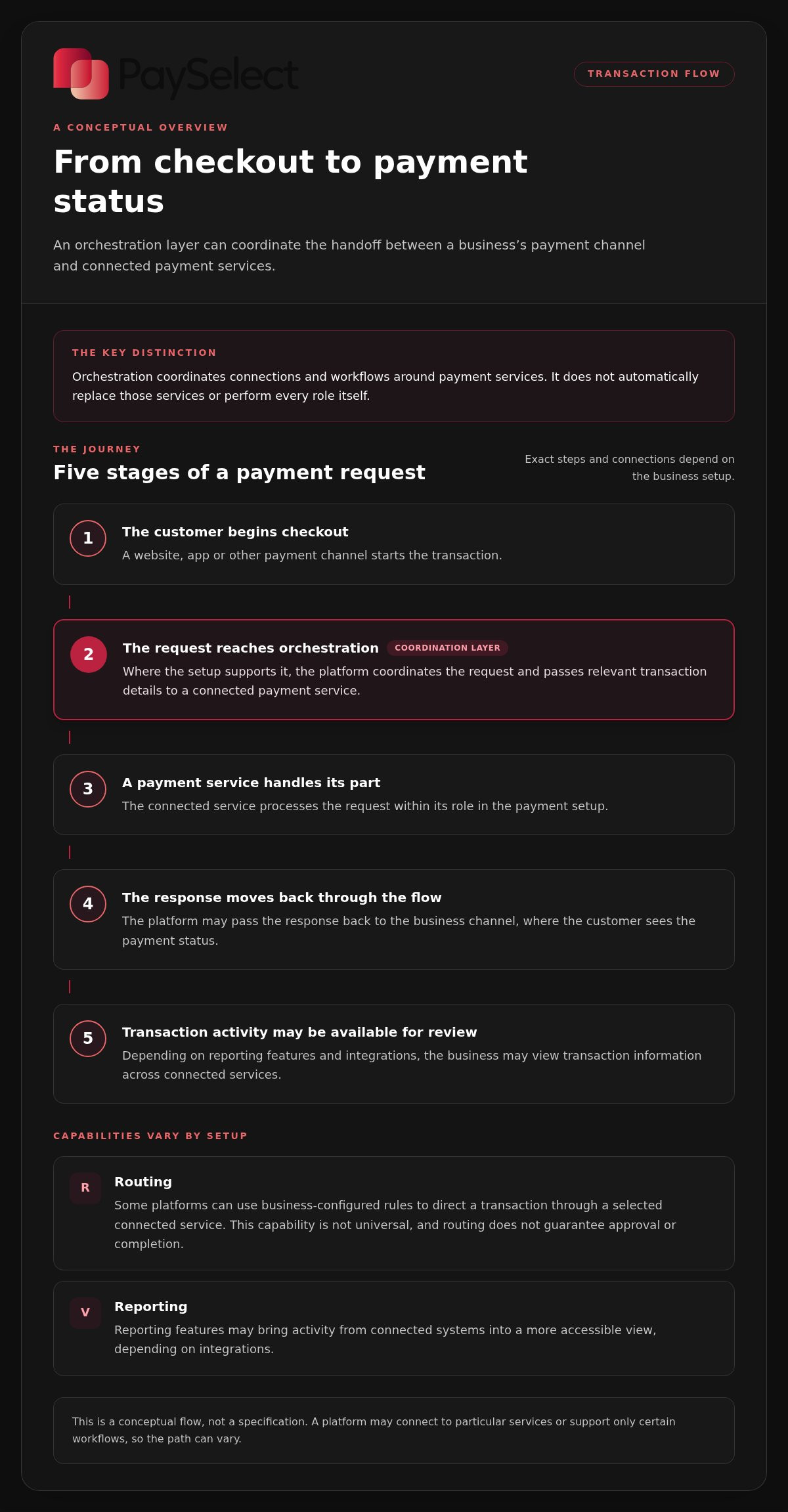
A customer sees a checkout or payment screen. Behind it, several services may handle different parts of the transaction. If orchestration is part of the setup, it sits between the business’s payment channel and connected payment services, coordinating the handoff according to the platform’s capabilities and configuration.
An orchestration layer sits between a business’s payment channel and connected payment services, coordinating how transaction requests and responses move between them. It doesn’t necessarily replace the services involved or control every step. The exact flow depends on the business’s setup.
What Happens When a Customer Starts a Payment?
Consider a customer paying through an online checkout. The journey can be understood as a sequence, although the precise steps and connections differ between businesses and platforms:
The customer begins checkout.
The business’s website, app or other payment channel starts the transaction.
The request reaches the orchestration platform.
Where the setup supports it, the platform coordinates the request and passes relevant transaction details to a connected payment service.
A payment service handles its part.
The connected service processes the request within its role in the payment setup.
The response returns through the flow.
The platform may pass the response back to the business channel, where the customer sees the payment status.
Activity may be recorded for review.
Depending on reporting features and integrations, the business may view transaction information across connected services.
This is a conceptual flow, not a specification. A platform may connect to particular services or support only certain workflows, so the path can vary.
How Can Routing and Reporting Fit In?
Some platforms can route a transaction using rules configured by the business, such as directing requests through a selected connected service. This capability isn’t universal, and routing doesn’t guarantee that a transaction will be approved or completed. Reporting features may also bring activity from connected systems into a more accessible view, depending on integrations and configuration.
For example, a business operating across online checkout and physical locations may want to understand which services handle each channel and where transaction records are held. If the platform supports those connections, orchestration could help coordinate the flow and review activity without treating every service as one system. Teams still need to understand what each connected service does and how its records relate to the platform’s reporting.
To assess whether an orchestration setup is relevant, map one real transaction from start to finish. Note the channel where it begins, the services it passes through, where the response appears and where staff find the transaction record. This makes gaps in handoffs or visibility easier to identify before considering additional technology.
Businesses reviewing how gateways fit into that flow can compare payment gateway options as part of understanding their existing setup. The important question isn’t whether a platform offers the longest feature list. It’s whether its available connections and workflows match the way your business accepts and manages payments.
Payment Orchestration vs Gateways, Processors and PSPs: What Is the Difference?
Payment terms can sound interchangeable, especially when a single company provides several services. To understand what is a payment orchestration platform, separate its typical role from the roles of gateways, processors and payment service providers. Orchestration generally coordinates connections and workflows; the other services support different parts of payment acceptance.
| Category | Typical role |
|---|---|
| Payment orchestration platform | Coordinates connections or payment workflows across services. Available integrations and functions vary. |
| Payment gateway | Provides a connection that helps pass payment information from a checkout or other channel to payment services. |
| Payment processor | Handles transaction information as part of processing a payment between the relevant parties. |
| Payment service provider (PSP) | May offer a combination of payment acceptance services, which can include gateway and processing functions. |
These are typical roles, not rigid boundaries. A provider’s services may span more than one category, and commercial models differ. A business may access gateway and processing functions through one provider, while another arrangement separates those roles. Compare what each service actually does in your setup, rather than relying only on the label.
Does Orchestration Replace a Gateway or Payment Provider?
Usually, orchestration coordinates services rather than replacing every provider in the payment setup. A business may keep its existing gateway or other payment relationships and add an orchestration layer to manage selected connections or workflows. Designs differ: some platforms may bundle certain functions, while others depend on separate services. Compare the roles and connections your business needs.
What Are the Trade-Offs of Adding an Orchestration Layer?
A coordination layer may make connected workflows and activity easier to manage, but it also adds a system to integrate and oversee. Teams need to understand how it fits with existing checkout, payment services and reporting processes. Its value depends on whether it addresses a genuine operational need, not on assumed improvements to cost or transaction performance.
Before assessing a platform, map the current setup in plain language:
List the roles
Identify which services provide the gateway, processing and other payment functions.
Trace the connections
Note how payment requests and responses move between your channels and services.
Identify the management work
Record where teams reconcile information, review reports or maintain separate workflows.
Then compare the map with the platform’s actual integrations, workflow options and reporting capabilities. A tool that connects to one part of your setup may not cover another. If your existing arrangement is straightforward, an additional layer could create more integration and oversight than value. For businesses comparing one component of the stack, reviewing payment gateway options can clarify that role without confusing it with orchestration.
When Should a Business Consider Payment Orchestration?
Payment orchestration is worth assessing when payment operations have become difficult to coordinate, not simply because a business has grown or started selling internationally. To decide whether it fits, first clarify what a payment orchestration platform would coordinate in your specific setup. The answer should connect to a practical need, such as managing separate payment flows or bringing activity from connected systems into a clearer view.
Which Business Needs Make Orchestration More Relevant?
A business accepting payments online and in person may have distinct processes for each channel. Add multiple provider relationships, separate teams or reporting requirements, and coordination can take more effort. International activity may also introduce additional payment needs, but operating across borders alone doesn’t make orchestration essential. Compare the demands of your markets and channels, including available cross-border payment solutions, with the complexity you need to manage.
Readiness signals can include:
Several channels
Online, mobile and in-person payments follow different workflows that are hard to oversee together.
Multiple markets
Different operating requirements create separate payment arrangements or reporting needs.
Several providers
Teams spend time coordinating relationships, processes or records across services.
Limited visibility
It takes extra work to understand payment activity across business units or channels.
These are prompts to investigate, not proof that you need another platform. A business with one main channel, a straightforward transaction flow and manageable reporting may find that an added coordination layer brings little value. More connections can also mean more integration and ongoing oversight. Focus on the friction you can identify today, not on features that may suit a different operating model.
What Should a Business Understand Before Evaluating Its Setup?
Build a simple inventory before comparing solutions. List each payment channel, where a transaction starts, the services involved, who manages each step and where the related information is reported. Note recurring operational issues, such as duplicated work or difficulty assembling a consistent view. Then separate must-haves from optional capabilities, so platform features are assessed against real business requirements rather than treated as benefits by default.
For example, if your priority is reviewing gateway choices, a payment gateway comparison can clarify that part of the setup. Consider whether a coordination layer addresses a documented challenge, whether its connections match your payment flows and whether your team can manage the added system. If these questions point to a genuine need, include payment comparison options in your assessment.
How PaySelect Helps Businesses Navigate Payment Orchestration Decisions
Understanding what is a payment orchestration platform can clarify the role it may play, but deciding whether it fits your business requires a close look at your existing payment setup. PaySelect helps businesses compare payment options and make sense of their needs. Its comparison tools and advisory services can support that assessment.
How Can Independent Comparison Clarify Payment Options?
Payment services can differ in their roles and suitability for a business’s channels, transaction volumes and international requirements. PaySelect’s comparison tools help make those differences easier to assess without favouring a named provider. PaySelect receives success-based fees from selected providers while providing transparent comparison data, so you can consider the available options in context.
For an initial match, PaySelect’s Take the Test tool uses a business’s industry, transaction volume and international requirements. These details help frame which payment options may fit the business context. The exercise can also help organise your priorities, such as online acceptance, in-person payments or cross-border needs. It helps you explore payment choices, rather than determining whether an orchestration platform is right for you or guaranteeing a particular result.
When Can Payment Infrastructure Advisory Help?
Large organisations and hotel groups may have complex payment arrangements spanning teams, channels and business units. PaySelect’s fixed-fee payment infrastructure advisory supports infrastructure audits and strategy development, helping organisations examine how their payment setup fits their operational needs. The focus is on assessing the infrastructure and shaping a strategy, not promising a specific saving or performance improvement.
Before exploring options, prepare a concise picture of your current setup:
Map payment channels
Note where customers pay and how each channel is managed.
List current requirements
Include transaction volume, operating markets and the payment needs of different teams.
Identify friction
Record where reporting, provider coordination or day-to-day processes require extra effort.
Separate essentials from preferences
Distinguish business-critical requirements from features that would be useful but are not necessary.
This gives comparisons and advisory discussions a clear starting point. PaySelect can help you compare gateways, POS systems and cross-border payment solutions in relation to your business requirements. Start by setting out what your current setup needs to support, then consider which options are relevant. Explore PaySelect’s payment guidance.
Make Your Payment Setup a Strategic Choice
Your next step is to turn payment questions into clear priorities. Decide what your current setup must support, where it creates extra work, and which needs may emerge as your business expands. That gives you a practical basis for weighing whether an additional coordination layer fits, rather than adding technology for its own sake.
Understanding what is a payment orchestration platform is useful because it separates the coordination role from the payment services your business already relies on. PaySelect offers independent comparison and guidance to help businesses explore options in light of their industry, transaction volume and international requirements.
You don’t need to resolve every technical detail before taking a first step. Start with the channels you use and the outcomes your payment setup needs to support. Compare payment options with PaySelect and move forward with a clearer view of what fits your business.
Frequently Asked Questions
Is a payment orchestration platform the same as a payment gateway?
No. A gateway usually connects a payment channel, such as a website checkout, with payment services. An orchestration platform coordinates connections or workflows across services. A retailer might use a gateway for its online checkout and consider orchestration if managing several payment arrangements creates extra work. Some companies combine functions, so compare the roles and capabilities involved rather than relying on product labels alone.
Can a payment orchestration platform work with existing payment providers?
It may, if the platform supports the relevant connections and they suit your current setup. Before evaluating one, list your existing providers and the tasks each performs, then compare that list with the platform’s available integrations. For example, a business may want to retain its current checkout arrangement while coordinating another payment flow. Compatibility isn’t automatic, and integration requirements can affect the effort involved.
How does payment routing work in an orchestration platform?
Where supported, routing uses configured rules to direct a transaction request to a connected payment service. A business might set rules based on a defined payment flow or operating requirement. The platform’s available criteria and controls vary, and routing doesn’t ensure that a transaction will be approved. Evaluate whether the routing options suit your real transaction patterns, rather than assuming the platform will select the best route automatically.
Does a payment orchestration platform process payments itself?
Not necessarily. Orchestration generally coordinates connections or workflows, while separate payment services handle their respective roles in the transaction. However, offerings can overlap, and some platforms may bundle additional payment functions. When assessing what is a payment orchestration platform, distinguish the software’s coordination role from the services that process or otherwise handle payments. That helps clarify which organisations are responsible for each part of your setup.
Is payment orchestration suitable for a small business?
It can be, but business size alone doesn’t determine fit. A small business with several channels, markets or payment relationships may have coordination needs worth assessing. By contrast, a business using one straightforward payment flow may find that an extra layer adds integration and management work without addressing a clear problem. Start with the operational issue you want to solve, then weigh it against the effort of adding another system.
Can payment orchestration support cross-border transactions?
It may help coordinate cross-border payment workflows if the platform connects to services that fit the business’s markets and transaction needs. International activity alone doesn’t mean orchestration is required. First identify where customers pay from, which payment services support those transactions, and how your team manages the resulting records. Then assess whether a coordination layer addresses a specific gap in those flows.
What should a business assess before considering payment orchestration?
Review your payment channels, transaction paths, existing service relationships and reporting needs. Note where staff spend time coordinating information or handling separate processes, and identify which issues matter most to the business. Then distinguish essential requirements, such as supporting a particular channel, from optional features. This assessment helps you judge whether orchestration addresses a real operational need and whether the required connections fit your current systems.
Disclaimer
This content is for informational purposes only and should not be considered financial, legal, or regulatory advice. Payment provider availability, pricing, and approval processes vary depending on individual business circumstances. PaySelect does not guarantee provider acceptance or specific outcomes. Businesses should conduct their own due diligence before entering into any agreements.
Empowering businesses to achieve greater growth