
A virtual terminal isn’t the right fit for every checkout. It’s designed for staff-assisted payments: a customer requests to pay remotely, and an employee enters the payment details into an online interface. If you’re asking what is a virtual terminal for payments, start with two questions: who enters the payment details, and where does that step fit into your business workflow?
Virtual terminals are easy to confuse with payment links, gateways and POS systems, especially when you’re comparing ways to accept payments. The right setup depends on how customers prefer to pay, whether staff need to enter details, and which payment options your business requires. This guide explains the payment flow, compares common tools and helps you assess use cases, limitations, pricing and security considerations in the UAE. PaySelect helps businesses compare payment options and providers based on factors such as industry, transaction volume and international requirements, so you can assess the differences against your own needs.
Key Takeaways
• Learn what is a virtual terminal for payments and how staff-entered remote transactions move through the payment process.
• Compare virtual terminals with payment links, gateways and POS systems by who initiates payment and where it happens.
• Assess whether this option fits your order channels, transaction frequency, staff workload, customer preferences and recordkeeping needs.
• Use a provider checklist to compare supported payment methods, user access, records, integrations, pricing and feature limitations.
• PaySelect can help you compare payment options based on your industry, transaction volume and international requirements.
What Is a Virtual Terminal for Payments?
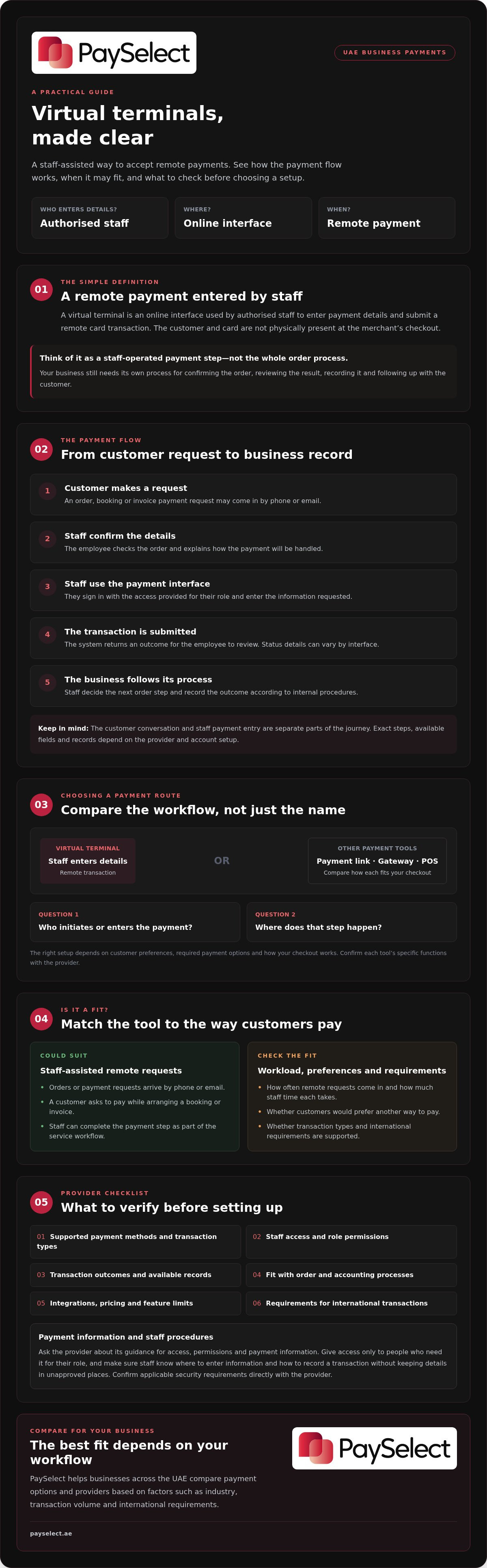
A virtual terminal is an online interface that authorised staff use to enter payment details and submit a remote card transaction. The customer and payment card aren’t physically present at the merchant’s checkout. Instead, staff submit the transaction through an interface supported by the payment provider.
If you’re asking what is a virtual terminal for payments, think of it as a staff-operated way to accept payment when a customer can’t or doesn’t use an in-person checkout. The provider and the business’s account setup determine which functions are available, so check how the specific service handles your intended transactions.
How does a virtual terminal work?
The basic process is simple: a staff member signs in to the provider-supported interface, enters the information it requests and submits the transaction. The system returns an outcome for the business to review. Depending on the setup, the interface may also provide a transaction record.
For example, a customer might call a service business to book an appointment and ask to pay during the call. An employee can enter the details requested by the interface and submit them while the customer stays on the phone. The conversation happens by phone; payment entry happens in the staff-facing interface. Available fields, staff permissions and recordkeeping options vary, so confirm these details with the provider before setting up the workflow.
Which businesses may use a virtual terminal?
This option may suit businesses that receive orders or payment requests by phone or email, such as service businesses handling remote bookings or invoices. It can also support a workflow where a customer contacts the business to arrange payment and staff complete the transaction. To judge the fit, consider how often these requests come in, how much staff time each one takes, and whether customers would prefer another way to pay.
Check that the provider supports the transaction types you need and that the service fits your wider payment setup. International transactions may involve different requirements depending on the markets and workflow involved. PaySelect helps businesses across the UAE compare payment options based on factors such as industry, transaction volume and international requirements. Learn more about cross-border payment solutions.
How a Virtual Terminal Fits into the Payment Process
A virtual terminal adds a staff-assisted payment step to an order that starts remotely. The customer communicates with your business through one channel, such as a phone call, while staff use a separate, provider-supported interface to submit the transaction. Understanding what is a virtual terminal for payments helps clarify its role: it supports the payment step, but it doesn’t determine how your business confirms the order, records it or follows up with the customer.
What happens during a staff-entered transaction?
The exact steps and options vary by provider. A typical journey looks like this:
The customer makes a request.
They contact your business to place an order, arrange a booking or pay an invoice.
Staff confirm the details.
The employee checks the order and explains what will happen next, including how the payment request will be handled.
Staff open the payment interface.
They sign in using the access provided for their role and enter the information the interface requests.
The transaction is submitted.
The provider’s system returns an outcome for the employee to review. Don’t assume every interface displays the same status or supporting information.
The business follows its normal process.
Staff use the result to decide whether to continue with the order, contact the customer or take another step. They then record the outcome according to internal procedures.
The customer interaction and staff payment entry are separate parts of the journey. Before choosing a setup, ask which transaction details appear, what records staff can access and whether those records fit your order and accounting processes. Timing and next steps can depend on the provider, account and transaction outcome, so build procedures around confirmed details rather than assumptions.
What should a business consider when handling payment information?
Clear procedures help staff handle remote payments consistently. Ask the provider to explain its guidance on staff access, permissions and payment information, then make sure your internal instructions match. Give access only to people who need it for their role. Make sure employees know where to enter information and how to record a transaction without keeping details in unapproved places.
Responsibilities can depend on your setup. Confirm applicable security requirements directly with the provider rather than assuming that using an online interface removes them. PaySelect offers a payment gateway comparison to help businesses assess available options against their requirements.
Virtual Terminal vs Payment Link, Gateway, and POS
These tools support different parts of a business’s checkout. A virtual terminal is operated by staff for remote transactions. A payment link lets a customer complete payment through a link. A gateway supports online payment transactions, while a POS system supports in-person acceptance. To compare them, look at who acts, where payment happens and how each option fits your workflow.
| Option | Who initiates payment? | Where does it happen? | Typical business workflow |
|---|---|---|---|
| Virtual terminal | Staff enter and submit transaction details | Remotely, through a provider-supported interface | Staff assist with a remote payment request |
| Payment link | The business sends a link; the customer completes payment | On the customer’s device | The customer follows the payment steps provided through the link |
| Payment gateway | The customer starts an online checkout | On a website or connected online checkout | The gateway supports online payment transactions |
| POS system | The customer pays at checkout | In person at the business | The business accepts payment through its in-person setup |
These options may work alongside one another, but they aren’t automatically interchangeable. A business might use a gateway for website orders and a POS system for in-person sales, while staff handle some remote requests through a virtual terminal. Features vary by provider and setup, so confirm how each option would work for your requirements.
Virtual terminal or payment link: who enters the payment details?
With a virtual terminal, staff operate the interface to submit a remote transaction. With a payment link, the business sends a customer-facing link and the customer completes the payment. Staff assistance may work better for a guided interaction; a link may suit a self-service workflow. Consider customer preference and the amount of staff time involved, then compare payment gateway options as part of reviewing online payment setups.
Virtual terminal or POS system: remote or in-person acceptance?
The practical distinction is where payment takes place. A virtual terminal supports remote, staff-assisted transactions; a POS system supports in-person acceptance. If your business takes payments in both settings, check whether one option alone can meet your needs. Explore POS system options when evaluating in-person payments.
When Does a Virtual Terminal Make Sense for a Business?
A virtual terminal may fit when customers place orders remotely and staff need to handle payment as part of the interaction. But “what is a virtual terminal for payments” is only the starting point. The practical question is whether staff-entered transactions fit your order volume, customer preferences and day-to-day process.
What are the practical advantages and trade-offs?
This channel gives a business a way to process remote requests through a staff-facing workflow, without requiring the customer to complete checkout on a website. That may be useful for phone orders, bookings or invoice-related requests when a customer wants direct assistance.
The trade-off is staff time. Employees may need to handle each transaction, follow clear procedures and keep related order records consistent. If remote payment requests are frequent, consider whether the workload suits your team or whether a self-service option would better match the customer journey. Capabilities and restrictions vary by provider and merchant setup, so verify what’s available before making the channel part of your process.
Questions to ask before choosing this channel
Start with your current workflow, not a provider’s feature list. Note how often staff receive remote payment requests and how those requests are handled today. Then consider whether customers usually want staff support or prefer to pay themselves, and what records your team needs to manage orders. These details help you compare options using the same criteria.
Ask each provider for clear details on:
Staff access
How can access be assigned to the people who need it?
Transaction records
What information is available to review and retain?
Payment methods
Which methods are supported for your intended transactions?
Pricing
How is pricing structured, and are there conditions or limitations to understand?
Workflow fit
Does the process work with your existing order handling and recordkeeping?
For businesses in the UAE serving customers in other markets, cross-border requirements may also affect provider selection. Review cross-border payment solutions as a related consideration, not as a feature guaranteed by a virtual terminal. The right fit depends on your business requirements, transaction volume and international needs.
Once you’ve defined your workflow and priorities, compare payment gateway options against those requirements. PaySelect offers independent comparison and decision support; it doesn’t process payments directly.
How to Evaluate a Virtual Terminal Provider and Choose Next Steps
Once you know what is a virtual terminal for payments and how it may fit your workflow, compare providers against your actual needs. A feature list or headline claim won’t tell you whether a service supports your order process, staff responsibilities and recordkeeping requirements. Ask providers to explain their terms and limitations, then assess each option against the same criteria.
What should you compare between providers?
Use this checklist to structure conversations with providers. Confirm the details for your business and account setup rather than assuming that every virtual terminal works the same way.
Workflow fit
Can the service support the remote payment requests your staff handle, and what steps would employees follow?
Supported methods
Which payment methods can customers use for the transactions you expect to process?
User access
What access controls and permissions are available for staff, and how are they managed?
Records and reporting
What transaction information can your team review, and will it meet your operational recordkeeping needs?
Integration needs
Does the service connect with the tools you already use, or would staff need to manage information separately?
Support arrangements
What help is available, and through which channels and hours?
Pricing and terms
Ask for a clear explanation of pricing components, contract terms and any conditions that could affect your use of the service.
Feature limitations
Which functions are included in your proposed setup, and are there restrictions on how or when you can use them?
Compare answers against your own transaction profile, including the types and frequency of remote payments you handle. Don’t assume a particular fee model or treat a broad claim as proof that a provider meets your requirements. Clear, comparable answers make it easier to identify differences and work out which questions still need resolving.
How can PaySelect help narrow the options?
Choosing between payment providers can be difficult when workflows, pricing and requirements vary. PaySelect is an independent comparison and advisory resource, not a payment processor or provider. Its comparison tool matches businesses with providers based on factors such as industry, transaction volume and international requirements. This can help you assess options against your needs without promising a particular result.
Define your priorities first, then Compare payment providers for your business to explore suitable options and decide what to verify directly with providers.
Choose a Payment Setup That Fits Your Workflow
Understanding what is a virtual terminal for payments helps you decide whether staff-entered remote transactions belong in your payment setup. A virtual terminal can support phone or other remote orders, while payment links, gateways and POS systems serve different roles. They may work together, but they aren’t interchangeable.
Before choosing, consider how customers place orders, how often staff handle remote payments, and what your team needs for access, transaction records and integrations. Ask providers to explain their pricing, supported methods and limitations, then compare their answers against your business requirements rather than headline claims.
For businesses across the UAE weighing their options, PaySelect provides independent comparison and payment infrastructure advisory. Its matching considers factors such as your industry, transaction volume and international requirements. PaySelect helps you assess providers, but doesn’t process payments directly.
Compare payment providers for your business and take the next step with a clearer view of your options. Start with your workflow, then use a considered comparison to decide what to verify with providers.
Frequently Asked Questions
Is a virtual terminal the same as a payment gateway?
No. A virtual terminal is an interface staff use to submit remote payment transactions. A payment gateway is part of the infrastructure that supports online payment information moving between a checkout and the payment service. They relate to different parts of the payment process, though a provider’s setup may connect them. Ask providers to explain how their specific services work together before choosing.
Can a small business use a virtual terminal?
Yes, a small business may use one if staff regularly handle remote orders, bookings or payment requests and the provider supports that workflow. Consider how often these transactions occur, how much time each takes and whether customers prefer staff assistance or self-service payment. A virtual terminal isn’t automatically the best fit for every small business, so compare it with the other channels available to your customers.
What is the difference between a virtual terminal and a POS system?
A virtual terminal is generally used by staff to process payments for remote transactions. A POS system is used to accept payments in person at a business’s checkout. The practical difference is the sales setting and workflow, not simply the technology involved. Businesses that take both remote and in-person payments may consider both options, then check the features and setup each provider offers.
Is a virtual terminal secure for taking payments?
Security depends on the provider’s service, your account setup and how staff handle payment information. Before using a virtual terminal, ask the provider to explain its security guidance, available staff access controls and your responsibilities. Limit access to employees who need it for their roles, and give staff clear procedures. Don’t assume that using an online interface removes the need to follow appropriate handling practices.
How do I choose a virtual terminal provider?
Compare providers against your actual workflow and transaction profile. Ask whether the service supports your intended remote payment process, which payment methods are available, how staff access is managed, what records you can review and whether integrations are needed. Request clear details about pricing components, terms, support arrangements and feature limitations. PaySelect offers independent comparison and advisory support, matching businesses based on industry, transaction volume and international requirements.
Can a virtual terminal accept payments from international customers?
It may, but don’t assume every provider or account supports the same countries, payment methods or transaction requirements. Describe the markets you serve and ask providers what their specific setup supports, including relevant limitations or terms. For businesses in the UAE with international needs, provider selection should reflect both the remote payment workflow and cross-border requirements. PaySelect can help compare cross-border payment solutions against those business needs.
Disclaimer
This content is for informational purposes only and should not be considered financial, legal, or regulatory advice. Payment provider availability, pricing, and approval processes vary depending on individual business circumstances. PaySelect does not guarantee provider acceptance or specific outcomes. Businesses should conduct their own due diligence before entering into any agreements.
Empowering businesses to achieve greater growth